



Selectors and Combinators

Published by
sanya sanya
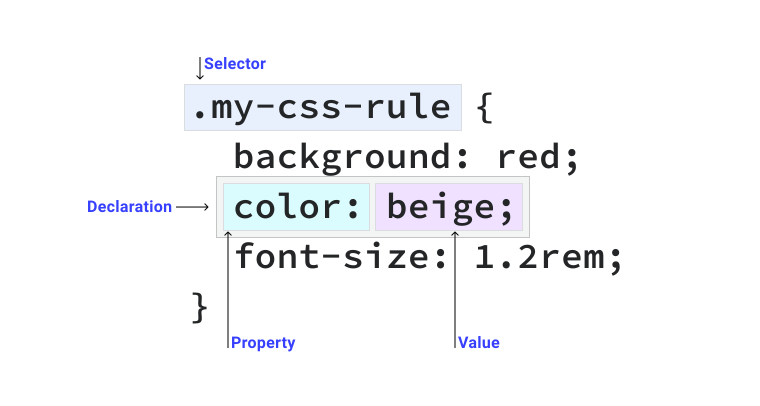
Firstly, before moving to the CSS Selectors and CSS Combinators. We must have to know that the CSS could be applied with the key pair values. Also, the key with their values must be in the {} as mentioned in the code below.
div {
   color: black;
   font-size: 2rem;
}
CSS Selectors
The Selectors in CSS are used to group the elements, tags, and classes to commonly apply CSS over them. There are five types of selectors available in the CSS and descriptively all are mentioned below -
- Universal Selectors - The `Universal Selectors` are used to apply the CSS to the whole webpage. We use `*` to use Universal Selector as mentioned in the code below -
- Element Selectors - The `Element Selectors` are used for selecting the elements and applying the same CSS over the selected elements as mentioned in the code below -
- ID Selectors - The `ID Selectors` are used to style the element as per the `id` given to them. ID is used for giving a special name to the element. The code showing ID Selector is mentioned below -
- Class Selectors - The `Class Selectors` are used to style the elements as per the `class` given to them. `Class` is used for giving a special name to a group of elements. The code showing Class Selector is mentioned below -
- Attributes Selectors - The `Attributes Selectors` are used to select the attributes in the Tags. The code for the `Attributes Selectors` is mentioned below -
a[target="_blank"] {background-color: yellow; }
*{
  margin: 0;
  padding: 0;
  box-sizing: border-box;
}
h1, h2, h3{
  margin: 3px;
  padding: 1px;
  color: cyan;
}
<h1 id="name">Code Skiller</h1>
#name {
      margin: 3px;
      padding: 1px;
      color: cyan;
}
<h1 class="name">Code Skiller</h1>
<p class="name">a b c d e</p>

.name {
      margin: 3px;
      padding: 1px;
      color: cyan;
}
CSS Combinators
CSS combinators are selectors that allow you to target specific elements based on their relationship with other elements in the HTML structure. Combinators are used to create complex and specific CSS selectors. Here are the four main types of CSS combinators.
- Descendant Selector (space) - A descendant selector selects an element that is a descendant of another element. It matches any element that is a descendant of the specified parent element, no matter how deeply nested.
- Child Selector (>) - A child selector selects an element that is a direct child of another element. It matches any element that is a direct child of the specified parent element.
- Adjacent Sibling Selector (+) - An adjacent sibling selector selects a directly adjacent element (immediately follows) another element. It matches any element that immediately follows the specified element.
.element1 + .element2 { // Style }
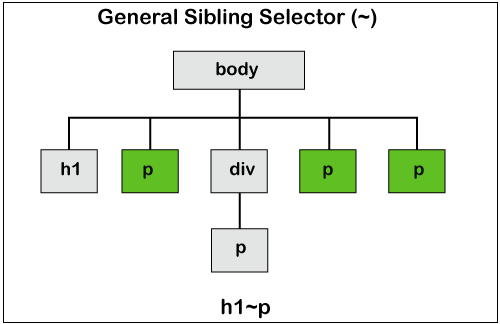
- General Sibling Selector (~) - A general sibling selector selects an element that is a sibling of another element. It matches any element that follows the specified element, regardless of whether it is immediately adjacent or not.
.parent-element .child-element { //Style }
.parent-element > .child-element { // style }
.element1 ~ .element2 { // Style }
Library
WEB DEVELOPMENT
Basic
HTML - Hyper Text Markup Language
CSS - Cascading Style Sheets
Cascading Style Sheets (CSS)
Selectors and Combinators
CSS Transforms
Units
CSS Icons and Colors
CSS Borders
CSS Margin
CSS Padding
CSS Dimensions
CSS Box Model
CSS Background
Pseudo Classes in CSS
CSS Positions
CSS Flexbox
Responsiveness in CSS
CSS Transitions
CSS Animations
Other CSS Properties
Var()
CSS Frameworks
CSS Grids
CSS Display Properties
JavaScript
Frontend
Backend
Interview Questions
FAANG QUESTIONS
On this page
CSS Selectors
CSS Combinators