



Object Referencing and Copying in JavaScript

Published by
sanya sanya
The main difference between the objects and Primitive Data Values is that the objects are copied and stored by references. However, the Primitive Values are copied as whole values.
Let's take an example of the Primitive values mentioned in the code below -
let message = "Hello World!";
let phrase = message;
console.log(phrase)
//Output: Hello World!
The output of the above code is quite obvious and expectable. However, in the case of objects, the scenario is completely different.
Moreover, In objects, the values are not stored or assigned as we stored in the case of primitive types. Therefore, objects get stored in their memory address which is also known as a reference to it. For instance,
let user = { name: 'Rakesh' };
let admin = user;
admin.name = 'Mukesh';
console.log(user.name);
//Output: Mukesh
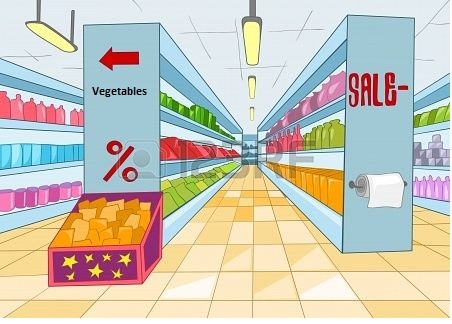
This can be understood with an example. Sam goes to the supermarket for shopping where he saw a lot of varieties. He found biscuits stored at a place and he fetched them. This show Primitive Data Values copying. However, he want to buy vegetables but he couldn't find them anywhere.
He look beside him and found a poster where the address of the vegetables with the direction where the vegetables were stored. He follow the address and went to the vegetable corner and finally fetched some vegetables too. This show `Object referencing.
Comparison by Reference
The Object Comparison can be done when both the values are the same object. The code describing the functionality of the Comparison by Reference is mentioned below -
let a = {}; let b = a; console.log( a == b ); // true, console.log( a === b ); // true
Cloning and Merging
The Copying an Object Variable created more than one reference to the same object objects many times. We can create a duplicate object by creating a new object and replicating the structure of the current one. For instance,
let user = { name: "Rakesh", age: 25 }; let clone = {}; for (let key in user) { clone[key] = user[key]; } clone.name = "Mukesh";
console.log( user.name );
//Output: Rakesh
We can also use Object.assign() which has the same working as of cloning and merging. The syntax is -
Object.assign(dest, ...sources)
The dest is the targeted object and the sources is the list of the objects at the source.
Nested Cloning
Nested cloning in JavaScript refers to the process of creating a deep copy of an object that contains nested objects or arrays. Moreover, nested cloning means an object within the object.
The code showing the working of the Nested Cloning is mentioned below -
let user = { name: "Rakesh", sizes: { height: 100, Rank: 57 } }; let clone = Object.assign({}, user);
console.log( user.sizes === clone.sizes );
user. sizes.width = 60;
console.log(clone.sizes.width);
//Output: true 60
The example shows deep cloning which is mentioned in the description.
StructuredClone
The structuredClone is the functional call that clones all the objects with all their nested properties. The working of the structuredClone call is mentioned below -
let user = { name: "Rakesh", sizes: { height: 100, Rank: 50 } }; let clone = structuredClone(user);
console.log( user.sizes === clone.sizes );
user.sizes.Rank = 60;
console.log(clone.sizes.Rank);
//Output: false 50
Library
WEB DEVELOPMENT
Basic
HTML - Hyper Text Markup Language
CSS - Cascading Style Sheets
JavaScript
An Introduction to Javascript!
How to Run JavaScript Code
Variables in Javascript
Numbers in JavaScript
JavaScript Operators
Data Types in JavaScript
Conditional Statements
Switch Statements
Loops in Javascript
Arrays in JavaScript
Strings in JavaScript
Objects in JavaScript
Object Methods in JavaScript
Functions in JavaScript
Object Referencing and Copying in JavaScript
' this' keyword
Asynchronous Programming in JavaScript
Callbacks in JavaScript
Promises in JavaScript
Constructor Functions in JavaScript
Async and Await in JavaScript
Type Conversion in Javascript
DOM
Currying in JavaScript
Network Request
Frontend
Backend
Interview Questions
FAANG QUESTIONS
On this page
Comparison by Reference
Cloning and Merging
Nested Cloning
StructuredClone