



Loops in Javascript

Published by
sanya sanya
Loops in Javascript iterate the code and we don't need to write similar things again and again. Instead, loops do this for us.
There are five types of loops in Javascript and all are mentioned below -
- For Loop
- While Loop
- do While Loop
- for in Loop
- for of Loop
For Loop
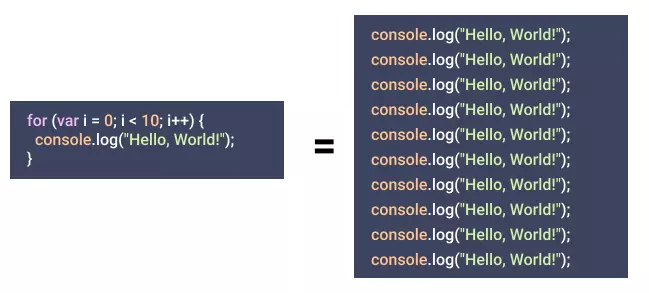
The For Loop in Javascript iterates a code over a particular number of times. The syntax of the for loop is mentioned below -
for(initialization, condition, updation){ //code block }
The code showing the working of the For Loop is mentioned below -
for(let i = 0; i<=3; i++){ console.log(i); }
//Output: 1 2 3
While Loop
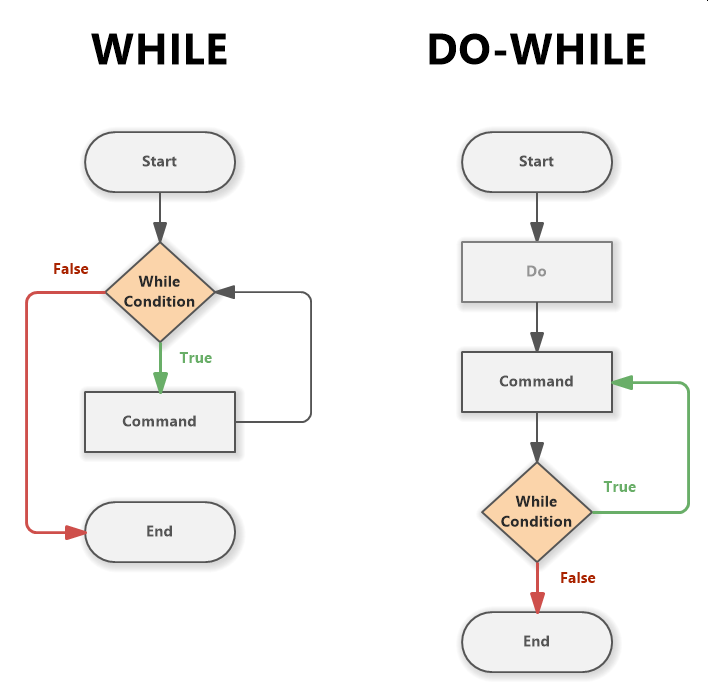
The While Loop iterates until the condition becomes true. The code showing the working of the while loop is mentioned below -
var i = 10; while(i < 15) { i++; console.log(i) }
//Output: 11 12 13 14 15
Do While Loop
The code in the do keyword must be executed once and after one iteration it will react the same as that of the Do While Loop.
The code initiating the working of While Loop is mentioned below -
var i = 10; do { i++; console.log(i) } while(i < 15)
//Output: 10 11 12 13 14
 ##for in loop
The `For in Loop` in Javascript is used to iterate through the properties of an object. The code showing the working of `For in Loop` is mentioned below -
##for in loop
The `For in Loop` in Javascript is used to iterate through the properties of an object. The code showing the working of `For in Loop` is mentioned below -
const person = {name: "Robert", country: "USA", age:25}; let text = ""; for (let x in person) { text += person[x]; }
//Output: Robert USA 25
For of Loop
The For of Loop in javascript is used for iterating through the values of iterable objects.
The code showing the working of the For Of Loop is mentioned below -
let tech = "web"; let result = ""; for (let result of tech) { result += result; }
//Output: w e b
Continue Keyword
The continue keyword doesn't stop the execution of the loop but it stops the execution of the current iteration and starts the next iteration. The code example for the same is mentioned below -
for (let i = 0; i < 10; i++) { if (i % 2 == 0) continue; console.log(i) }
//Output: 1,4,6,8
Library
WEB DEVELOPMENT
Basic
HTML - Hyper Text Markup Language
CSS - Cascading Style Sheets
JavaScript
An Introduction to Javascript!
How to Run JavaScript Code
Variables in Javascript
Numbers in JavaScript
JavaScript Operators
Data Types in JavaScript
Conditional Statements
Switch Statements
Loops in Javascript
Arrays in JavaScript
Strings in JavaScript
Objects in JavaScript
Object Methods in JavaScript
Functions in JavaScript
Object Referencing and Copying in JavaScript
' this' keyword
Asynchronous Programming in JavaScript
Callbacks in JavaScript
Promises in JavaScript
Constructor Functions in JavaScript
Async and Await in JavaScript
Type Conversion in Javascript
DOM
Currying in JavaScript
Network Request
Frontend
Backend
Interview Questions
FAANG QUESTIONS
On this page
For Loop
While Loop
Do While Loop
For of Loop
Continue Keyword