



JavaScript Operators

Published by
sanya sanya
The Operators in Javascript are used to perform mathematical operations in the Javascript Code. Several Operations like concatenation, adding two values, and so on can be achieved using operators.
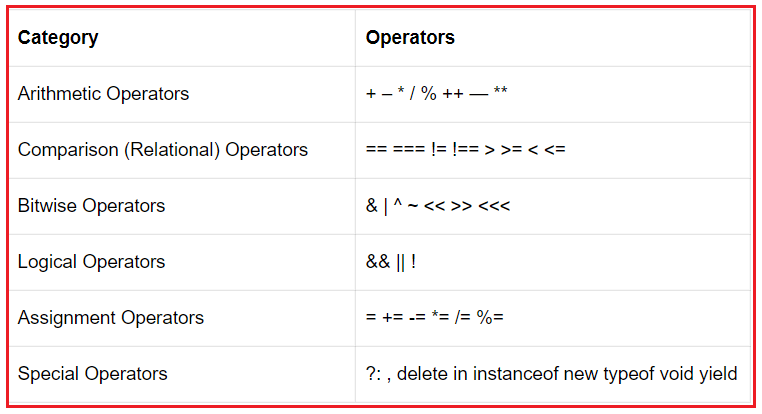
Different Types of Operators in Javascript by which we can perform various tasks are -
- Assignment Operators
- Arithmetic Operators
- Comparison Operators
- Logical Operators
- Bitwise Operators
- String Operators
Various Javascript operators can perform multiple tasks, in such cases, Javascript is like -
Arithmetic Operators
The operators which can handle mathematical tasks in Javascript are known as Arithmetic Operators. Different Types of Arithmetic Operators are -
Addition (+) - The `Addition operator is used to add two or more numbers and the code for the same is mentioned below -
let a = 1;
let b = 2;
console.log(a+b);
//Output: 3
Subtraction (-) - The Subtraction Operator is used to subtract a value from another. The Code for the same is as follows -
let a = 1; let b = 2; console.log(b-a);
//Output: 1
Multiplication (*) - It is used to multiply two or more values. The code for the same is as follows -
let a = 1; let b = 2; console.log(a*b);
//Output: 2
Division (/) - We can divide two values using the division operation as shown below -
let a = 4; let b = 2; console.log(a/b);
//Output: 2
Exponentiation (**) - It will power the number with the number written next to it as below -
let a = 4; let b = 2; console.log(a**b);
//Output: 16
Modulus (%) - It will return the remainder when two numbers are divided as follows -
let a = 4; let b = 2 console.log(a%b);
//Output: 0
Increment (++) - It is used for incrementing the values as follows -
let a = 3; const b = a++; console.log(
a:${a}, b:${b});
// Expected output: "a:4, b:3"
Decrement (--) - It is used to decrease the value as follows -
let a = 3; const b = a--; console.log(
a:${a}, b:${b});
// Expected output: "a:2, b:3"
Assignment Operators
The Assignment Operators are used to assign values to the Javascript variables. Different types of Assignment Operators are as follows -
- "=" which can be written as a=b.
- "+=" which can be written as a+=b.
- "-=" which can be written as a-=b.
- "*=" which can be written as a*=b.
- "/=" which can be written as a/=b.
- "%=" which can be written as a%=b.
- "**=" which can be written as a**=b.
A code snippet showing the use of the assignment operators is mentioned below -
let a = 5; a += 5 console.log(a)
//Output: 10
Comparison Operators
The Operators which are used for comparing values are known as Comparison Operators. Various Comparison Operators in Javascript are as follows -
- "=" - Equals
- "===" - Equal value and equal type
- "!=" - Not equal
- "!==" - Not Equal value and not equal type
- ">" - Greater than
- "<" - Less than
- ">=" - Greater than or equal to
- "<=" - Less than or equal to
- "?" - Ternary Operator
let a = 5; let b = 7; console.log(a >= b);
//Output: false
String Operators
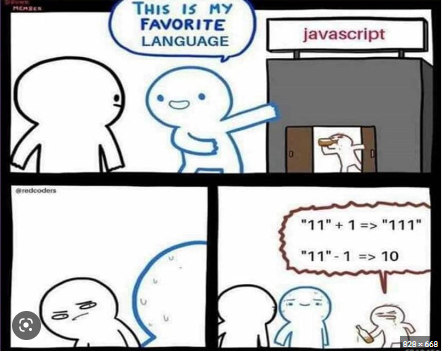
All the operators mentioned above like Arithmetic Operators, Assignment Operators, can be used with string as mentioned in the code below -
let str_1 = "Hello"; let str_2 = "World"; console.log(str_1+str_2);
//Output: Hello World
 ##Logical Operators
The Operator who performs operations on binary numbers is known as a `Logical Operator`. There are three types of Logical Operators as follows -
##Logical Operators
The Operator who performs operations on binary numbers is known as a `Logical Operator`. There are three types of Logical Operators as follows -
- && - Logical AND - The result will be true if all the inputs are true.
- || - Logical OR - The result will be true if any of the two inputs is true.
- ! - Logical NOT - Convert false to true and true to false.
Bitwise Operators
These operators work on bits. The input must be converted to 32 bits binary before applying bitwise operators. Different types of Bitwise Operators are -
- & - AND
- | - OR
- ~ - NOT
- ^ - XOR
- << - Left Shift
- >> - Right Shift
- >>> - unsigned Right Shift
Bitwise Operators is as follows -
let x = 5 & 1; let y = 5 | 1; console.log(x) console.log(y)
//Output: 1 //Output: 5
Library
WEB DEVELOPMENT
Basic
HTML - Hyper Text Markup Language
CSS - Cascading Style Sheets
JavaScript
An Introduction to Javascript!
How to Run JavaScript Code
Variables in Javascript
Numbers in JavaScript
JavaScript Operators
Data Types in JavaScript
Conditional Statements
Switch Statements
Loops in Javascript
Arrays in JavaScript
Strings in JavaScript
Objects in JavaScript
Object Methods in JavaScript
Functions in JavaScript
Object Referencing and Copying in JavaScript
' this' keyword
Asynchronous Programming in JavaScript
Callbacks in JavaScript
Promises in JavaScript
Constructor Functions in JavaScript
Async and Await in JavaScript
Type Conversion in Javascript
DOM
Currying in JavaScript
Network Request
Frontend
Backend
Interview Questions
FAANG QUESTIONS
On this page
Arithmetic Operators
Assignment Operators
Comparison Operators
String Operators
Bitwise Operators