



JavaScript Interview Questions

Published by
sanya sanya
Q1. How do you compare Objects and Maps?
Comparing Objects and Maps
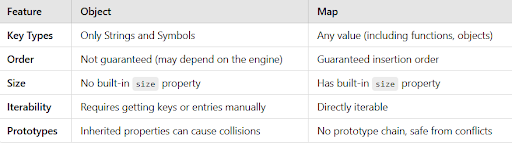
Objects and Maps share some similarities, both allowing you to associate keys with values, retrieve those values, delete keys, and check if something is stored at a particular key. However, there are key differences that make using Maps preferable in certain scenarios:
i. Key Types: Objects use only Strings and Symbols as keys, while Maps accept any value as keys, including functions, objects, and primitive data types.
ii. Order: Maps maintain the order of keys, while Objects do not guarantee any particular order when iterating over their keys.
iii. Size: Maps provide a convenient size property to determine their size, whereas the number of properties in an Object must be determined manually.
iv. Iterability: Maps are iterable, enabling straightforward iteration, while iterating over an Object involves obtaining its keys and then iterating over them.
v. Prototypes: Objects have a prototype chain, potentially causing collisions with your keys. Maps avoid this issue by design or can be created with no prototype using Object.create(null).
vi. Performance: Maps may offer better performance in scenarios with frequent addition and removal of key-value pairs.
- Key Types: Objects only accept strings or symbols as keys, while Maps can accept any type of key
const obj = {};
obj[123] = "value"; // Key is coerced to string
console.log(obj); // { "123": "value" }

const map = new Map();
map.set(123, "value"); // Key remains as a number
map.set({ name: "obj" }, "object key"); // Key can be an object
console.log(map); // Map(2) { 123 => "value", { name: "obj" } => "object key" }
- Order: Maps maintain insertion order, Objects do not guarantee order
const objOrder = { z: 1, a: 2, b: 3 };
console.log(Object.keys(objOrder)); // May output: ["z", "a", "b"] or ["a", "b", "z"] depending on engine

const mapOrder = new Map();
mapOrder.set("z", 1);
mapOrder.set("a", 2);
mapOrder.set("b", 3);
console.log([...mapOrder.keys()]); // Output: ["z", "a", "b"]
- Size: Objects don't have a built-in size property, but Maps do
const objSize = { a: 1, b: 2, c: 3 };
console.log(Object.keys(objSize).length); // 3

const mapSize = new Map();
mapSize.set("a", 1);
mapSize.set("b", 2);
mapSize.set("c", 3);
console.log(mapSize.size); // 3
- Iterability: Objects require manual iteration, Maps are directly iterable
// Object iteration using for-in (requires checking hasOwnProperty)
for (let key in objOrder) {
  if (objOrder.hasOwnProperty(key)) {
    console.log(key, objOrder[key]); // Output: z 1, a 2, b 3
  }
}

// Directly iterable Map
for (let [key, value] of mapOrder) {
  console.log(key, value); // Output: z 1, a 2, b 3
}
- Prototypes: Objects have a prototype chain which can cause key collisions
const objWithProto = Object.create({ toString: () => "Custom toString" });
objWithProto.someKey = "value";
console.log(objWithProto.someKey); // "value"
console.log(objWithProto.toString()); // "Custom toString" (from prototype)

const mapWithProto = new Map();
mapWithProto.set("toString", "Map's own toString key");
mapWithProto.set("someKey", "value");
console.log(mapWithProto.get("someKey")); // "value"
console.log(mapWithProto.get("toString")); // "Map's own toString key"
Q2. What is a first class function?
First-Class Function
In JavaScript, functions are considered first-class objects, which means they can be treated like any other variable. This concept allows functions to be:
Passed as arguments to other functions. Returned as values from other functions. Assigned to variables just like any other data type. For instance, you can assign a function to a variable and then use that variable as a reference to the function:
Q3. What is a first-order function?
First-Order Function
A first-order function is a function that does not accept another function as an argument and does not return a function as its result. It operates solely on its own, without interacting with other functions in this manner.
First-Order Function Example
function add(a, b) {
  return a + b;
}

console.log(add(2, 3)); // Output: 5
Q4. What are the possible ways to create objects in JavaScript?
Different Ways to Create Objects in JavaScript
Creating objects in JavaScript can be done through various methods. Here are several approaches:
i. Object Constructor: The simplest way to create an empty object is by using the Object constructor. However, this method is currently not recommended.
var object = new Object();
ii. Object's Create Method: The create method of the Object creates a new object by specifying the prototype object as a parameter.
var object = Object.create(null);
iii. Object Literal Syntax: The object literal syntax is equivalent to the create method when it passes null as a parameter.
var object = {};
iv. Function Constructor: You can create objects by defining a function and applying the new operator to create object instances.
function Person(name) {
    var object = {};
    object.name = name;
    object.age = 21;
    return object;
}
var object = new Person("Sudheer");
v. Function Constructor with Prototype: This approach is similar to the function constructor but uses prototypes for properties and methods.
function Person() {}
Person.prototype.name = "Sudheer";
var object = new Person();
vi. ES6 Class Syntax: ES6 introduced the class feature for creating objects.
class Person {
    constructor(name) {
        this.name = name;
    }
}
var object = new Person("Sudheer");
vii. Singleton Pattern: A singleton is an object that can only be instantiated once, and repeated calls to its constructor return the same instance.
var object = new function() {
    this.name = "Sudheer";
}
Q5. What is a prototype chain?
Understanding the Prototype Chain
The prototype chain is a concept used in JavaScript to create new types of objects based on existing ones. It is akin to inheritance in class-based languages.
In JavaScript, the prototype of an object instance can be accessed using Object.getPrototypeOf(object) or the proto property. On the other hand, the prototype of constructor functions is accessible through Object.prototype.
The prototype chain is essential for object inheritance and defining methods and properties that can be shared among objects while allowing for customization as needed.
function explainPrototypes() {
    // Objects
    let obj = {};
    console.log("Object Prototype:", obj.__proto__ === Object.prototype); // true

    // Arrays
    let arr = [];
    console.log("Array Prototype:", arr.__proto__ === Array.prototype); // true
    console.log("Array -> Object:", arr.__proto__.__proto__ === Object.prototype); // true

    // Strings
    let str = "hello";
    console.log("String Prototype:", str.__proto__ === String.prototype); // true
    console.log("String -> Object:", str.__proto__.__proto__ === Object.prototype); // true

    // Numbers
    let num = 42;
    console.log("Number Prototype:", num.__proto__ === Number.prototype); // true
    console.log("Number -> Object:", num.__proto__.__proto__ === Object.prototype); // true

    // Booleans
    let bool = true;
    console.log("Boolean Prototype:", bool.__proto__ === Boolean.prototype); // true
    console.log("Boolean -> Object:", bool.__proto__.__proto__ === Object.prototype); // true

    // Functions
    let func = function() {};
    console.log("Function Prototype:", func.__proto__ === Function.prototype); // true
    console.log("Function -> Object:", func.__proto__.__proto__ === Object.prototype); // true

    // Object.prototype -> null (End of the chain)
    console.log("Object.prototype -> null:", Object.prototype.__proto__ === null); // true
}

explainPrototypes();
Q6. What is the difference between Call, Apply, and Bind?
Distinguishing Between Call, Apply, and Bind in JavaScript
Understanding the disparity among Call, Apply, and Bind methods can be clarified with the following instances:
- Call: The call() method summons a function, providing a particular 'this' value along with individual arguments.
var employee1 = {firstName: 'John', lastName: 'Rodson'};
var employee2 = {firstName: 'Jimmy', lastName: 'Baily'};
function invite(greeting1, greeting2) {
    console.log(greeting1 + ' ' + this.firstName + ' ' + this.lastName+ ', '+ greeting2);
}
invite.call(employee1, 'Hello', 'How are you?'); // Hello John Rodson, How are you?
invite.call(employee2, 'Hello', 'How are you?'); // Hello Jimmy Baily, How are you?
- Apply: Apply invokes the function, specifying a 'this' value and allowing the passage of arguments as an array.
invite.apply(employee1, ['Hello', 'How are you?']); // Hello John Rodson, How are you?
invite.apply(employee2, ['Hello', 'How are you?']); // Hello Jimmy Baily, How are you?
- Bind: The bind method generates a new function, enabling the transmission of any number of arguments. It's important to note that it doesn't execute the function immediately.
var inviteEmployee1 = invite.bind(employee1);
var inviteEmployee2 = invite.bind(employee2);
inviteEmployee1('Hello', 'How are you?'); // Hello John Rodson, How are you?
inviteEmployee2('Hello', 'How are you?'); // Hello Jimmy Baily, How are you?
Call and Apply are similar in that they execute the function right away, differing mainly in how arguments are passed (individually or as an array). Remember, "Call" aligns with a comma-separated list, and "Apply" corresponds to an array.
Q7. What is JSON and its common operations?
JSON and Its Common Operations
JSON, or JavaScript Object Notation, is a text-based data format following JavaScript object syntax. It's commonly used for data transmission across networks. Here are some essential JSON operations:
Parsing: This operation transforms a JSON-formatted string into a native object.
JSON.parse(text) Stringification: Stringification is the process of converting a native object into a JSON-formatted string for network transmission.
JSON.stringify(object)
Converts a JavaScript object into a JSON-formatted string, typically for network transmission.
const jsonString = '{"name": "John", "age": 30}';
const obj = JSON.parse(jsonString);
console.log(obj.name); // Output: John


JSON.parse(text): Converts a JSON string into a JavaScript object.
JSON.stringify(object): Converts a JavaScript object into a JSON string.

const obj = { name: "Jane", age: 25 };
const jsonString = JSON.stringify(obj);
console.log(jsonString); // Output: {"name":"Jane","age":25}
Q8. What is the purpose of the array slice method?
Purpose of Array Slice Method
The slice() method in arrays selects specific elements and creates a new array with those elements. It begins with the element specified by the start argument and ends just before the element indicated by the optional end argument, without including that element. If the end argument is omitted, it selects elements until the end of the array.
Here are some examples:
let arrayIntegers = [1, 2, 3, 4, 5];
let arrayIntegers1 = arrayIntegers.slice(0, 2); // Returns [1, 2]
let arrayIntegers2 = arrayIntegers.slice(2, 3); // Returns [3]
let arrayIntegers3 = arrayIntegers.slice(4); // Returns [5]
It's important to note that the slice() method doesn't modify the original array; instead, it produces a new array containing the selected subset.
These functions and methods are valuable tools in JavaScript, enhancing its versatility for various programming tasks.
Q9. What is the purpose of the array splice method?
The Purpose of the Array Splice Method
The splice() method serves the function of adding or removing items within an array and subsequently returning the removed item. It requires two primary arguments: the first specifies the array position for insertion or deletion, and the optional second argument indicates the number of elements to be deleted. Additional arguments are included to be added to the array.
It's crucial to note that the splice() method modifies the original array and also returns the deleted array.
Q10. What is the difference between == and === operators?
Distinguishing == and === Operators
JavaScript provides both strict (===, !==) and type-converting (==, !=) equality operators. The strict operators consider variable types, while non-strict operators perform type conversion based on variable values. Here are the conditions for different types:
i. Strings: Strictly equal when they have the same sequence of characters, length, and corresponding character positions.
ii. Numbers: Strictly equal if they are numerically equal; this includes handling NaN and positive/negative zero.
iii. Booleans: Strictly equal if both are true or both are false.
iv. Objects: Strictly equal if they refer to the same object.
v. Null and Undefined: Not equal with === but equal with ==.
Examples illustrating these cases:
0 == false // true 0 === false // false 1 == "1" // true 1 === "1" // false null == undefined // true null === undefined // false '0' == false // true '0' === false // false [] == [] // false (different objects in memory) {} == {} // false (different objects in memory)
These comparisons demonstrate the nuances between strict and type-converting equality operators in JavaScript.
Q11. What are lambda or arrow functions?
Lambda or Arrow Functions
An arrow function, denoted by =>, is a more concise syntax for defining functions in JavaScript. These functions have some unique characteristics:
- They do not have their own this context, which means they inherit the this value from their surrounding code.
- Arrow functions do not have their own arguments object, so they cannot be used as variadic functions.
- cannot be used as constructors to create objects.
- They are particularly suitable for non-method functions.
// Regular function
function regularFunction() {
  console.log(this);  // Refers to the global object (or undefined in strict mode)
}

// Arrow function
const arrowFunction = () => {
  console.log(this);  // Inherits `this` from the surrounding context
};

// Example demonstrating `this` context
const obj = {
  name: "JavaScript",
  regularMethod: function() {
    console.log(this.name);  // Refers to the object itself
  },
  arrowMethod: () => {
    console.log(this.name);  // Inherits `this` from the surrounding context, not the object
  }
};

obj.regularMethod();  // Output: JavaScript
obj.arrowMethod();    // Output: undefined (inherits global `this`)


// Arrow function with arguments (no `arguments` object)
const sum = (...args) => {
  console.log(args);  // Can use rest parameters to handle variadic arguments
  return args.reduce((total, num) => total + num, 0);
};

console.log(sum(1, 2, 3, 4));  // Output: 10
Q12. What are modules?
Modules in JavaScript are small, self-contained units of code that encapsulate functionality and can be reused across different parts of an application. Modules can export variables, functions, or objects, making them available for use in other parts of the code.
Q13. Why do you need modules?
Modules in JavaScript offer several advantages:
i. Maintainability: Modules help organize code into smaller, manageable units, making it easier to maintain and update specific functionality.
ii. Reusability: Modules allow you to encapsulate and export reusable pieces of code, reducing duplication and improving code consistency.
iii. Namespacing: Modules provide a way to encapsulate variables and functions, preventing naming conflicts with other parts of your code and ensuring a clean and organized namespace for your application.
Q14. What is the scope in JavaScript?
Scope in JavaScript refers to the visibility and accessibility of variables, functions, and objects within specific parts of your code during runtime. It determines where in your code certain variables and resources can be accessed and manipulated. The scope can be categorized into local (function) scope, block scope (introduced with let and const), and global scope. Understanding scope is crucial for proper variable management and preventing naming conflicts.
// Global scope
let globalVar = "I'm a global variable";

function testScope() {
  // Function scope
  let localVar = "I'm a local variable";

  if (true) {
    // Block scope (inside if block)
    let blockVar = "I'm a block-scoped variable";
    console.log(blockVar); // Accessible here
  }

  console.log(localVar); // Accessible here
  console.log(globalVar); // Accessible here

  // Block-scoped variables are not accessible outside the block
  // console.log(blockVar); // Error: blockVar is not defined
}

testScope();

console.log(globalVar); // Accessible globally
// console.log(localVar); // Error: localVar is not defined
Q15. What is a service worker?
A Service Worker is essentially a script, typically written in JavaScript, that operates in the background, independently of a web page. It provides various features that don't require user interaction or a visible web page. Some key functionalities of service workers include enabling rich offline experiences (such as offline-first web applications), facilitating periodic background synchronization, delivering push notifications, intercepting and handling network requests, and programmatically managing a cache of responses.
Q16. How do you manipulate the DOM using a service worker?
Service workers themselves cannot directly manipulate the DOM (Document Object Model) as they run in a separate thread from the web page. However, they can communicate with the pages they control by responding to messages sent through the postMessage interface. These messages can contain instructions or data that web pages can use to manipulate the DOM. In essence, service workers enable communication between pages and can trigger DOM manipulation actions in response to events or messages.
Q17. Why JavaScript is Treated as Single-Threaded?
JavaScript is considered a single-threaded language because its language specification doesn't allow for concurrent execution of code in multiple threads or processes. This is in contrast to languages like Java, Go, and C++, which can create multi-threaded and multi-process programs.
Q18. What is Event Delegation?
Event delegation is a technique where you assign a parent element as the listener for events happening inside it. Instead of attaching event listeners to individual child elements, you capture events as they bubble up to the parent. This can improve performance and simplify event handling.
let listItems = document.querySelectorAll('.item');
let parentContainer = document.querySelector('.container');
console.log(listItems);

// Adding individual event listeners to each list item would require looping:
// listItems.forEach((listItem) => {
//     listItem.addEventListener('click', () => {
//         console.log(listItem.innerText);
//     });
// });

parentContainer.addEventListener('click', (event) => {
    // Access the clicked element
    let clickedItem = event.target;
    console.log(clickedItem.innerText);
});
Q19. What is ECMAScript?
ECMAScript is the standardized scripting language that serves as the foundation for JavaScript. It is specified by the ECMA International organization in the ECMA-262 and ECMA-402 standards. The first edition of ECMAScript was released in 1997.
Q20. How do you delete a cookie?
To delete a cookie, you can set its expiration date to a date in the past. This effectively tells the browser to remove the cookie. You do not need to specify a value for the cookie; setting the expiration date alone will delete it. For example:
document.cookie = "username=; expires=Fri, 07 Jun 2019 00:00:00 UTC; path=/;";
It's essential to define the cookie's path option to ensure that you delete the correct cookie, especially if your website has multiple paths or pages that may set cookies. Some browsers may require specifying the path for cookie deletion.
Q21. What are the differences between cookies, local storage, and session storage?
Here are the distinctions between cookies, local storage, and session storage:
Accessed on client or server side:
- Cookies can be accessed on both the server side and the client side.
- Local storage and session storage are accessible only on the client side within a web browser.
Lifetime:
- Cookies can have a lifetime set using the "Expires" attribute or exist until explicitly deleted.
- Local storage persists data indefinitely until manually cleared by the user or through JavaScript.
- Session storage data exists only for the duration of a single-page session and is cleared when the session ends.
SSL support:
- Cookies can be marked as "Secure" and transmitted only over HTTPS connections.
- Local storage and session storage do not have built-in support for this level of security.
Maximum data size:
- Cookies typically have a maximum size of around 4KB.
- Local storage and session storage offer larger storage capacities, typically up to 5MB each.
// Cookies: Set, Get, and Delete
document.cookie = "name=Tushar Satija; expires=Fri, 31 Dec 2024 23:59:59 GMT; path=/"; // Set cookie
console.log("Cookie:", document.cookie); // Get all cookies
document.cookie = "name=; expires=Thu, 01 Jan 1970 00:00:00 UTC; path=/"; // Delete cookie

// Local Storage: Set, Get, and Remove
localStorage.setItem("name", "Tushar Satija"); // Set item
console.log("Local Storage:", localStorage.getItem("name")); // Get item
localStorage.removeItem("name"); // Remove item

// Session Storage: Set, Get, and Remove
sessionStorage.setItem("name", "Tushar Satija"); // Set item
console.log("Session Storage:", sessionStorage.getItem("name")); // Get item
sessionStorage.removeItem("name"); // Remove item
Q22. What is the main difference between localStorage and sessionStorage?
The primary difference between localStorage and sessionStorage lies in their data persistence:
-
localStorage: Data stored in localStorage persists even after the browser is closed and reopened. It has no expiration time and remains available until explicitly removed.
-
sessionStorage: Data stored in sessionStorage is available only for the duration of a single page session. It gets cleared automatically when the user closes the tab or window.
Q23. How do you access web storage?
To access web storage (both localStorage and sessionStorage), you can use the following JavaScript methods:
- Set an item: Use setItem(key, value) to store data. For example:
localStorage.setItem('username', 'John');
- Get an item: Use getItem(key) to retrieve data. For example:
let username = localStorage.getItem('username');
- Remove an item: Use removeItem(key) to delete a specific item. For example:
localStorage.removeItem('username');
- Clear storage: Use clear() to remove all items from storage. For example:
localStorage.clear();
Q24. What are the methods available on session storage?
Session storage provides several methods for managing stored data:
- setItem(key, value): Stores a key-value pair.
- getItem(key): Retrieves the value associated with a given key.
- removeItem(key): Removes a specific item based on its key.
- clear(): Clears all data stored in session storage.
Q25. What is a storage event and its event handler?
A storage event is an event that is fired when a storage area (either localStorage or sessionStorage) has been changed in another document within the same origin. The event object contains information about the change, including the key that was modified, the old value, and the new value.
The event handler for the storage event is defined as follows:
window.onstorage = function (event) {
  // Handle the storage event here
};
This event handler function is called when changes occur in the storage area (e.g. when data is added, updated, or removed). It allows you to react to changes made by other scripts or pages from the same origin.
Q26. Why do you need web storage?
Web storage is valuable for several reasons:
-
Data Persistence: Web storage allows you to store data on the client side, ensuring that information persists across page reloads and browser sessions.
-
Efficiency: It provides a more efficient and lightweight alternative to using cookies for client-side data storage.
-
Security: Unlike cookies, web storage data is not sent to the server with every HTTP request, enhancing security and reducing unnecessary network traffic.
-
Large Data Storage: Web storage can store larger amounts of data compared to cookies, making it suitable for various purposes, including caching and user preferences.
Q27. How do you check web storage browser support?
You can check for web storage support in a browser using conditional statements. Here's an example:
if (typeof Storage !== "undefined") {
  // Web storage is supported; you can use it here
} else {
  // Web storage is not supported in this browser
}
This code checks if the Storage object is defined in the browser, indicating support for web storage. If it's defined, you can proceed to use web storage features; otherwise, you can provide a fallback or alternative solution.
Q28. How do you check web workers browser support?
To check for web worker support in a browser, you can use a conditional statement like this:
if (typeof Worker !== "undefined") {
  // Web workers are supported; you can use them here
} else {
  // Web workers are not supported in this browser
}
This code checks if the Worker object is defined, indicating support for web workers. If supported, you can proceed to use web workers for parallel processing tasks; otherwise, you can provide a fallback or alternative approach.
Q29. Give an example of a web worker.
Here's an example of a web worker that increments a count value and communicates with the main JavaScript thread:
counter.js (Web Worker Script)

let i = 0;
function timedCount() {
  i = i + 1;
  postMessage(i); // Send the updated count to the main thread
  setTimeout(timedCount, 500);
}
timedCount();
web_worker_example.js (Main Script)

let w;
if (typeof w === "undefined") {
  w = new Worker("counter.js"); // Create a web worker
}

// Listen for messages from the web worker
w.onmessage = function (event) {
  document.getElementById("message").innerHTML = event.data; // Display the count value
};

// Terminate the web worker when done
w.terminate();
In this example, a web worker script (counter.js) increments a count and sends the updated count to the main thread using postMessage. The main script (web_worker_example.js) creates the web worker, listens for messages, and terminates the web worker when finished.
Q30. What are the restrictions of web workers on DOM?
Web workers have restrictions on accessing the DOM (Document Object Model) because they run in a separate thread and don't have direct access to the DOM of the main page. Specifically:
-
They cannot access the Window object, which represents the browser window and its properties.
-
They cannot manipulate the Document object, which represents the web page's content and structure.
-
They cannot access the Parent object, which typically refers to the parent window or document that opened the web worker.
-
These restrictions are in place for security and performance reasons, as allowing web workers to directly interact with the DOM could lead to synchronization issues and potential security vulnerabilities.
Q31. What is a promise?
A promise is an object in JavaScript that represents the eventual completion or failure of an asynchronous operation. It provides a way to work with asynchronous code in a more organized and manageable manner. Promises have three states:
-
Pending: The initial state when the promise is created and hasn't been resolved or rejected yet.
-
Fulfilled: The state when the promise successfully completes, returning a resolved value.
-
Rejected: The state when an error or exception occurs during the asynchronous operation, providing a reason for the failure.
Promises are commonly used for handling tasks such as network requests, file operations, and other asynchronous operations. They help improve the readability and maintainability of asynchronous code by allowing you to chain operations and handle errors more effectively.
Q32. Why do you need a promise?
Promises are needed to handle asynchronous operations in JavaScript. They offer several advantages:
-
Improved Readability: Promises provide a more structured and readable way to work with asynchronous code, avoiding deep callback nesting (callback hell).
-
Error Handling: Promises have built-in error-handling capabilities, making it easier to catch and handle exceptions that occur during asynchronous operations.
-
Chaining: You can chain multiple asynchronous operations together, defining a sequence of steps to execute one after the other.
-
Easier Debugging: Promises make it easier to debug asynchronous code, as errors are captured and can be handled in a centralized manner.
-
Compatibility: Promises are a widely adopted standard in modern JavaScript, making code more compatible and maintainable.
Q33. What are the three states of a promise?
A promise can be in one of three states:
-
Pending: This is the initial state when the promise is created and has not yet resolved or rejected. It represents an ongoing asynchronous operation.
-
Fulfilled: The promise transitions to the fulfilled state when the asynchronous operation is successfully completed. It signifies that the promise has a resolved value.
-
Rejected: The promise transitions to the rejected state if an error or exception occurs during the asynchronous operation. It signifies that the promise has a reason for the failure.
These three states represent the lifecycle of a promise, indicating whether it's still processing, has succeeded, or has encountered an error.
Q34. What is the strict mode in JavaScript?
Strict mode is a feature introduced in ECMAScript 5 (ES5) that allows developers to place their JavaScript code or entire scripts into a "strict" operating context. When strict mode is enabled, the JavaScript engine enforces stricter rules and generates more exceptions for common coding mistakes. It helps developers write cleaner, safer, and more reliable code by catching errors and preventing potentially problematic behavior.
To enable strict mode for an entire script, you include the following statement at the beginning of your script:
"use strict";
You can also enable strict mode for a specific function scope by including the statement within that function.
Q35. Why do you need strict mode?
Strict mode is beneficial for several reasons:
-
Error Detection: It helps detect and throw errors for common coding mistakes that might otherwise go unnoticed, such as using undeclared variables or assigning values to read-only properties.
-
Improved Performance: Some JavaScript engines can optimize code more effectively in strict mode, potentially leading to improved performance.
-
Preventing Silent Failures: In non-strict mode, certain actions may fail silently, causing unexpected behavior. Strict mode helps to eliminate these silent failures by turning them into exceptions.
-
Enhanced Security: Strict mode can prevent the use of potentially dangerous features, making the code more secure.
-
Future Compatibility: Following strict mode guidelines prepares your code for compatibility with future versions of JavaScript, where some behaviors in non-strict mode might change.
Q36. What is a callback function?
A callback function is a function that is passed as an argument to another function and is executed after the completion of that function. Callbacks are commonly used in asynchronous programming to ensure that certain code is executed only after a specific task or operation has finished.
For example, when making an asynchronous network request, you can provide a callback function that will be called when the response is received. This allows you to handle the response data or perform other actions once the data is available.
Callback functions are fundamental in event-driven and non-blocking JavaScript environments, allowing you to work with asynchronous tasks effectively.
Q37. Why do we need callbacks?
Callbacks are needed in JavaScript because JavaScript is an event-driven and non-blocking language. Instead of waiting for a task to complete before moving on to the next one, JavaScript continues executing other code while listening for events and responding to them when they occur.
Callbacks provide a mechanism for defining what should happen after a specific task or event has finished. They are essential for:
-
Handling asynchronous operations, such as network requests, file reading, and timers.
-
Ensuring that certain code executes in response to events like button clicks, user input, or data retrieval.
-
Managing the flow of execution in non-blocking environments by specifying what to do when a task is completed.
-
Callbacks help JavaScript achieve concurrency and responsiveness in applications.
Q38. What is a callback hell?
Callback hell, also known as "Pyramid of Doom," is an anti-pattern in JavaScript that occurs when multiple asynchronous operations are nested within one another using callbacks. This leads to deeply nested and hard-to-read code, making it challenging to manage and debug.
In callback hell, code can become highly indented and difficult to follow, especially when error handling is involved. This problem arises when dealing with complex asynchronous sequences that depend on the results of previous operations.
To mitigate callback hell, developers often use techniques like modularization, named functions, and promises to create more structured and readable asynchronous code.
Q39. What are server-sent events?
Server-Sent Events (SSE) is a web technology that enables servers to push data to web clients over a single HTTP connection. SSE provides a simple and efficient way to send real-time updates or events from the server to the client without the need for continuous polling.
SSE is particularly useful for applications that require real-time notifications, such as news feeds, chat applications, and live sports scores. It simplifies the implementation of real-time features in web applications by allowing the server to initiate communication with the client whenever new data is available.
Q40. How do you receive server-sent event notifications?
To receive server-sent event notifications in a web application, you can use the EventSource API. Here's an example of how to set up an EventSource to listen for server-sent events:
if (typeof EventSource !== "undefined") {
  const source = new EventSource("sse_generator.js"); // Specify the URL of the SSE endpoint

  // Define an event listener for incoming messages
  source.onmessage = function (event) {
    // Handle the received event data
    document.getElementById("output").innerHTML += event.data + "<br>";
  };
} else {
  // Server-Sent Events are not supported in this browser
}
In this code, the EventSource object is used to establish a connection to the server-sent events endpoint (sse_generator.js). When the server sends an event, the specified on message event handler is called, allowing you to process and display the event data on the web page.
Q41. How do you check browser support for server-sent events?
You can check whether the browser supports Server-Sent Events (SSE) before using them in your web application. To do this, you can use a conditional statement like the following:
if (typeof EventSource !== "undefined") {
  // Server-Sent Events are supported in this browser
  // You can proceed to use them here
} else {
  // Server-Sent Events are not supported in this browser
  // Provide a fallback or alternative solution if needed
}
This code checks if the EventSource object is defined in the browser, which indicates support for SSE. If the object is defined, you can proceed to use SSE features; otherwise, you may need to provide an alternative mechanism for real-time updates.
Q42. What are the events available for server-sent events?
Server-Sent Events (SSE) provide several events for handling different aspects of the communication. The main events associated with SSE are:
-
onopen: This event is triggered when a connection to the server is successfully opened. You can use it to perform actions when the connection is established.
-
onmessage: This event is triggered when a message is received from the server. You can use it to process and display the data sent by the server.
-
onerror: This event occurs if an error happens during the SSE communication, such as a connection failure or network issue. It allows you to handle errors gracefully.
These events enable you to respond to different stages of the SSE communication, from establishing a connection to handling incoming messages and dealing with errors.
Q43. What are the main rules of promise?
Promises in JavaScript follow a set of rules to ensure consistent behavior and reliability:
-
A promise is an object: Promises are instances of the Promise object in JavaScript.
-
Standard-compliant .then() method: Promises must provide a .then() method conforming to the Promise/A+ specification for handling fulfillment and rejection.
-
Pending state: A promise starts in the pending state when it is created, indicating that the asynchronous operation is ongoing.
-
Fulfilled state: A promise transitions to the fulfilled state when the asynchronous operation is successfully completed, providing a resolved value.
-
Rejected state: A promise transitions to the rejected state if an error occurs during the asynchronous operation, supplying a reason for the failure.
-
Once settled, it doesn't change: Once a promise is settled (fulfilled or rejected), its state and value (or reason) should not change. It remains in that state.
These rules ensure that promises provide a consistent and predictable way to work with asynchronous operations in JavaScript.
Q44. What is a callback in callback?
"Callback in callback" refers to the practice of nesting callback functions within other callback functions. This is often done to ensure that asynchronous operations are executed sequentially, one after the other, in a specific order. Callbacks in callbacks are used to create a sequence of actions that depend on the results of previous asynchronous tasks.
For example, you might load multiple scripts in a web page using asynchronous loadScript functions, where each script is loaded only after the previous one has finished loading. Here's a simplified example:
loadScript('/script1.js', function(script1) {
  console.log('First script is loaded');

  loadScript('/script2.js', function(script2) {
    console.log('Second script is loaded');

    loadScript('/script3.js', function(script3) {
      console.log('Third script is loaded');

      // Perform additional actions after all scripts are loaded
    });
  });
});
In this code, the callback for each loadScript function ensures that the next script is loaded only when the previous one has completed loading. This pattern helps maintain the order of execution in asynchronous code.
Q45. What is promise chaining?
Promise chaining is a technique used to sequence asynchronous operations using promises. It allows you to execute a series of asynchronous tasks one after another in a specific order, creating a more structured and readable flow of code.
In promise chaining, each .then() method returns a new promise, enabling you to attach additional .then() handlers to it. This allows you to define a sequence of steps to be executed when promises resolve successfully, with each step depending on the result of the previous one.
Here's an example of promise chaining:
new Promise(function(resolve, reject) {
  setTimeout(() => resolve(1), 1000);
})
.then(function(result) {
  console.log(result); // 1
  return result * 2;
})
.then(function(result) {
  console.log(result); // 2
  return result * 3;
})
.then(function(result) {
  console.log(result); // 6
  return result * 4;
});
In this example, each .then() handler receives the result of the previous one and defines the next step in the sequence. Promise chaining makes it easier to manage and structure asynchronous code, improving code readability and maintainability.
Q46. What is Promise.all?
Promise.all is a method available in JavaScript for working with promises. It takes an array (or any iterable) of promises as input and returns a new promise. This new promise will be resolved when all the promises in the input array have been resolved successfully or rejected if any of the promises in the input array gets rejected.
Here's the basic syntax of Promise.all:
Promise.all([promise1, promise2, promise3])
  .then(function(results) {
    // Do something with the results
  })
  .catch(function(error) {
    // Handle any errors
  });
Promise.all is often used when you need to perform multiple asynchronous tasks in parallel and wait for all of them to complete before proceeding with further actions.
Q47. What is the purpose of the race method in promises?
The Promise.race() method is another method for working with promises in JavaScript. It takes an iterable (such as an array) of promises as input and returns a new promise. This new promise will be settled (resolved or rejected) as soon as the first promise from the input iterable settles, whether it resolves or rejects. In other words, it "races" the promises, and the result of the fastest promise wins.
Here's an example of using Promise.race to race two promises:
const promise1 = new Promise((resolve, reject) => {
  setTimeout(resolve, 500, 'one');
});

const promise2 = new Promise((resolve, reject) => {
  setTimeout(resolve, 100, 'two');
});

Promise.race([promise1, promise2])
  .then(function(value) {
    console.log(value); // "two" (because promise2 resolved first)
  })
  .catch(function(error) {
    // Handle any errors
  });
Promise.race is useful when you want to take action as soon as any of several asynchronous tasks is completed, regardless of whether it succeeds or fails.
Q48. How do you declare strict mode?
To declare strict mode in JavaScript, you simply add the following statement to the beginning of your script or to a specific function:
"use strict";
When this statement is included at the start of a script, it applies strict mode to the entire script. When placed within a function, it only affects the code within that function's scope.
Here's an example of enabling strict mode for an entire script:
"use strict";

// Your JavaScript code here

And here's an example of enabling strict mode for a specific function:

function myFunction() {
  "use strict";

  // Strict mode is enabled for this function
  // Your code here
}
Once strict mode is declared, it applies its rules and error-checking to the code within its scope.
Q49. What is the purpose of double exclamation (!!)?
The double exclamation (!!) is a JavaScript idiom used for type coercion and converting a value to a boolean. It's often used to ensure that a value is strictly interpreted as either true or false. When you apply !! to a value, it converts the value to its corresponding boolean representation.
For example, consider the following:
let value = "Hello";

let boolValue = !!value;

console.log(boolValue); // true
In this example, !!value converts the non-empty string "Hello" into true because any non-empty string is truthy in JavaScript.
This idiom is commonly used to handle situations where you want to ensure that a value is treated as a boolean, regardless of its original type.
Q50. What is event bubbling?
Event Bubbling: Event bubbling is a type of event propagation where an event is initially triggered on the innermost target element and then progressively propagates to its ancestor (parent) elements in the same hierarchy until it reaches the outermost DOM element.
Q51. What is event capturing ?
Event Capturing: Event capturing is a form of event propagation in which the event is first captured by the outermost element and then successively triggers on the descendants (children) of the target element within the same nesting hierarchy until it reaches the innermost DOM element.
Q52. What is the purpose of the delete operator?
The delete operator in JavaScript is used to remove a property from an object or to delete an element from an array. Its purpose is to remove a specific property or element, making it no longer accessible.
Here's an example of using delete to remove a property from an object:
const person = {
  name: "John",
  age: 30
};

delete person.age;

console.log(person); // { name: "John" } (the "age" property is removed)
And here's an example of using delete to remove an element from an array:
const numbers = [1, 2, 3, 4, 5];

delete numbers[2];

console.log(numbers); // [1, 2, undefined, 4, 5] (the element at index 2 is removed but leaves an undefined gap)
It's important to note that delete only removes the property or element, and it doesn't change the length of an array. Also, in the case of object properties, it doesn't affect the object's prototype chain.
Q53. What is the typeof operator?
The typeof operator in JavaScript is used to determine the data type of a given expression or variable. It returns a string representing the data type of the operand.
Here are some examples of using the typeof operator:
typeof "John" // "string"
typeof 42 // "number"
typeof true // "boolean"
typeof { name: "John", age: 30 } // "object"
typeof [1, 2, 3] // "object"
typeof undefined // "undefined"
typeof null // "object" (a historical mistake, should be "null")
typeof function() {} // "function"
The typeof operator is often used when you need to check the data type of a value or variable before performing certain operations to ensure that they are of the expected type.
Q54. What is an undefined property?
An undefined property in JavaScript refers to a property of an object that has been accessed, but the property itself does not exist on the object. Attempting to access an undefined property will not throw an error; instead, it will return the special value undefined.
Here's an example:
const person = {
  name: "John",
  age: 30
};
console.log(person.city); // undefined
In this example, person.city is an undefined property because the city property does not exist on the person object.
It's important to note that trying to access undefined properties can lead to unexpected behavior in your code, so it's a good practice to check if a property exists before accessing it to avoid errors.
Q55. What is eval?
The eval() function in JavaScript is used to evaluate a string as JavaScript code and execute it within the current scope. It takes a string as an argument, which should contain a valid JavaScript expression, statement, or a sequence of statements.
Here's a simple example of using eval():
const x = 10;
const y = 20;
const result = eval("x + y"); // Evaluates the string as code: 10 + 20
console.log(result); // 30
In this example, eval("x + y") evaluates the string "x + y" as JavaScript code, and the result is 30.
It's important to note that the use of eval() should be done with caution, as it can introduce security risks and make code harder to optimize. In many cases, there are safer alternatives to achieve the same functionality without using eval().
Q56. Is JavaScript a case-sensitive language?
JavaScript as a Case-Sensitive Language: Yes, JavaScript is case-sensitive. It distinguishes between uppercase and lowercase letters in variable names, function names, and other identifiers.
Q57. Is there any relation between Java and JavaScript ?
Relation Between Java and JavaScript: There is no direct relationship between Java and JavaScript. They are distinct programming languages with different syntax, semantics, and use cases. The similarity in names is largely due to historical marketing decisions. Both are object-oriented languages, but they serve different purposes and have separate ecosystems.
Q58. What is the difference between window and document?
window and document are both global objects in the context of a web browser, but they represent different aspects of the browser's environment:
window:
- The window object represents the entire browser window or the global environment in which your JavaScript code runs.
- It provides access to global variables, functions, and objects.
- It represents the browser window itself, including properties like window.innerWidth, window.innerHeight, and methods like window.open().
document:
- The document object represents the web page or document currently displayed in the browser window.
- It provides access to the structure and content of the web page, including the DOM (Document Object Model).
- It is mainly used to manipulate and interact with HTML elements on the page, such as reading or modifying content, handling events, and making changes to the page's structure.
In summary, window represents the browser window and provides access to global aspects of the environment, while document represents the web page content and structure, allowing you to work with the document's elements and content.
Q59. How do you access history in JavaScript?
In JavaScript, you can access the browser's history using the window.history object. The history object provides methods and properties to interact with the browser's navigation history, including moving forward and backward through the history stack.
Here are some commonly used properties and methods of the window.history object:
-
history.length: Returns the number of entries in the history stack.
-
history.back(): Moves the browser back to the previous page in the history.
-
history.forward(): Moves the browser forward to the next page in the history.
-
history.go(index): Moves the browser to a specific page in the history stack, where index is a positive or negative integer. A positive value goes forward, and a negative value goes backward.
Here's an example of using these methods:
console.log(window.history.length); // Get the number of history entries

// Go back one page in history
window.history.back();

// Go forward one page in history
window.history.forward();

// Go to a specific page in history (e.g., go back 2 pages)
window.history.go(-2);
These methods allow you to navigate through the user's browsing history within the context of your web page.
Q60. How do you detect the Caps Lock key turned on or off?
You can detect whether the Caps Lock key is turned on or off using JavaScript by checking the KeyboardEvent object when a keyboard event occurs. Specifically, you can use the getModifierState("CapsLock") method to check the state of the Caps Lock key.
Here's an example of how to detect the Caps Lock key state when a keyboard event occurs:
<input type="password" onkeydown="checkCapsLock(event)">
<p id="capsLockFeedback"></p>

<script>
function checkCapsLock(event) {
  const capsLockFeedback = document.getElementById("capsLockFeedback");

  if (event.getModifierState("CapsLock")) {
    capsLockFeedback.textContent = "Caps Lock is ON";
  } else {
    capsLockFeedback.textContent = "Caps Lock is OFF";
  }
}
</script>
In this example, when a keydown event occurs in an input field of type "password," the checkCapsLock function is called, which checks the state of the Caps Lock key using event.getModifierState("CapsLock") and updates the content of the capsLockFeedback element accordingly.
This approach provides real-time feedback to the user about the Caps Lock key's state as they type in a password field.
Q61. What is isNaN?
The isNaN() function in JavaScript is used to determine whether a value is "Not-a-Number" (NaN) or not. It returns true if the provided value is NaN, and false if it is a valid number or can be converted to one.
Here are some examples of using isNaN():
- isNaN(42); // false (42 is a valid number)
- isNaN("42"); // false ("42" can be converted to a number)
- isNaN("Hello"); // true ("Hello" cannot be converted to a number)
- isNaN(NaN); // true (NaN is Not-a-Number)
It's important to note that isNaN() performs type coercion, meaning it tries to convert the argument to a number before checking if it's NaN. To check for NaN without type coercion, you can use the Number.isNaN() method introduced in ECMAScript 2015 (ES6).
Q61. What are the differences between undeclared and undefined variables?
Undeclared variables and undefined variables represent different scenarios in JavaScript:
Undeclared variables are variables that have not been declared using the var, let, or const keyword. Accessing an undeclared variable will result in a reference error.
// Accessing an undeclared variable (ReferenceError)
console.log(undeclaredVariable);
Undefined variables are variables that have been declared but have not been assigned a value. When you access an undefined variable, it returns the special value undefined.
let undefinedVariable;
console.log(undefinedVariable); // undefined
Here are the key differences:
Declaration:
- Undeclared variables have not been declared using any variable declaration keyword (var, let, const).
- Undefined variables have been declared but have not been assigned a value.
Accessing:
- Accessing an undeclared variable results in a ReferenceError.
- Accessing an undefined variable returns the value undefined.
Assignment:
- You cannot assign a value to an undeclared variable because it has not been declared.
- You can assign a value to an undefined variable, which will no longer be undefined.
Scope:
- Undeclared variables are typically treated as global variables if not found in the current scope.
- Undefined variables exist within their declared scope.
- In practice, it's a best practice to declare all variables using var, let, or const to avoid issues with undeclared variables, and you should initialize variables to appropriate values to avoid using them when they are undefined.
Q62. What are global variables?
Global Variables: Global variables are accessible throughout the entire code without any specific scope. If you omit the var keyword when declaring a variable, it becomes a global variable. For instance:
msg = "Hello"; // When var is missing, it becomes a global variable
Q63. What are the problems with global variables?
Global variables can lead to issues such as conflicts between variable names in local and global scopes. Additionally, code relying heavily on global variables can be challenging to debug and test.
Q64. What is NaN property?
NaN Property: The NaN property is a global property that represents the "Not-a-Number" value. It signifies that a value is not a valid number. While it's rare to intentionally use NaN in a program, it can serve as a return value in certain cases. For example:
Math.sqrt(-1);
parseInt("Hello");
Q65. What is the purpose of isFinite function?
Purpose of isFinite Function: The isFinite() function is employed to ascertain whether a number is a finite and valid numerical value. It returns false if the value is positive or negative infinity or NaN (Not-a-Number), otherwise, it returns true. Here are some examples:
isFinite(Infinity); // false
isFinite(NaN); // false
isFinite(-Infinity); // false
isFinite(100); // true
Q66. What is an event flow ?
Event Flow: Event flow pertains to the sequence in which events are received on a web page. When you click an element nested within other elements, the click event must traverse through each parent element, starting from the global window object, before reaching its target element. There are two types of event flow:
Top to Bottom (Event Capturing) Bottom to Top (Event Bubbling)
Q67. How do you submit a form using JavaScript ?
Submitting a Form Using JavaScript: You can submit a form in JavaScript by invoking the submit() method on the form element.
Here's an example:
function submitForm() {
    document.forms[0].submit();
}
Q68. How do you find operating system details?
Finding Operating System Details: You can access information about the visitor's browser and operating system using the window.navigator object. Some OS-related properties can be found under the platform property, like this:
console.log(navigator.platform);
Q69. What is the difference between document load and DOMContentLoaded events?
Difference Between document load and DOMContentLoaded Events:
The DOMContentLoaded event is triggered when the initial HTML document has been completely loaded and parsed, without waiting for external assets (e.g., stylesheets, images) to finish loading. In contrast, the load event is fired when the entire page, including all dependent resources, has fully loaded.
Q70. What is the difference between native, host and user objects ?
Native, Host, and User Objects:
-
Native Objects: Native objects are part of the JavaScript language, as defined by the ECMAScript specification. They include core objects like String, Math, RegExp, Object, and Function.
-
Host Objects: Host objects are provided by the browser or runtime environment (e.g., window, XMLHttpRequest, DOM nodes).
-
User Objects: User objects are created by JavaScript developers in their code, often for storing application-specific data or defining custom classes.
Q71. What are the tools or techniques used for debugging JavaScript code?
These tools and techniques are commonly used for debugging JavaScript code:
- Chrome DevTools
- Debugger Statements
- Console Logging
Q72. What are the pros and cons of promises over callbacks ?
Pros and Cons of Promises Over Callbacks: Promises offer several advantages over callbacks:
Pros:
- Improved Readability
- Enhanced Error Handling
- Chaining for Sequential and Parallel Execution
- Mitigation of Callback Hell
Cons:
- Increased Code Complexity
- Possible Need for ES6 Polyfills in Older Environments
Q73. What is the difference between an attribute and a property?
Difference Between Attributes and Properties:
- Attributes are defined in HTML markup and provide initial values for elements, while properties are accessed via the DOM and represent the current state of elements.
- Attributes are used for setting initial values and metadata, whereas properties reflect the real-time state of elements.
Q74. What is same-origin policy?
Same-Origin Policy:
The same-origin policy is a security measure that restricts JavaScript from making requests across different domains. It defines an "origin" as a combination of the URI scheme, hostname, and port number. This policy prevents malicious scripts on one page from accessing sensitive data on other pages via the Document Object Model (DOM).
Q75. What is the purpose of void 0 ?
Purpose of void 0: void 0 is used to prevent unintended page refreshes. It returns the undefined primitive value, effectively preventing side effects caused by links that navigate to new pages. For example:
<a href="javascript:void(0);" onclick="alert('Click Me!')">Click Me</a>
Q76. Is JavaScript a compiled or interpreted language?
JavaScript as a Compiled or Interpreted Language: JavaScript is primarily an interpreted language, executed line by line by the browser's JavaScript engine. Some modern engines use Just-In-Time (JIT) compilation to convert JavaScript into machine code for optimized execution just before it runs.
Q77. What are events ?
Events: Events in web development refer to actions or occurrences that take place within a web page or application. JavaScript can respond to these events, which include actions like page loading, user input changes, button clicks, and more. Event handling enables interactivity and dynamic behavior in web applications.
Here's an example illustrating the behavior of a click event for a button element:
<!DOCTYPE html>
<html>
<head>
<script>
function greet() {
    alert('Hello! Good morning');
}
</script>
</head>
<body>
<button type="button" onclick="greet()">Click me</button>
</body>
</html>
Q78. Who Created JavaScript?
JavaScript was developed by Brendan Eich in 1995 during his time at Netscape Communications. Initially, it was created under the name "Mocha," but it was later officially named "LiveScript" when it was first released in beta versions of Netscape.
Q79. What is the use of preventDefault method?
Use of preventDefault Method: The preventDefault() method is used to cancel an event if it is cancelable, preventing the default action or behavior associated with that event. For instance, it can be used to prevent form submission when clicking a submit button or to stop a hyperlink from navigating to its URL. Here's an example:
document.getElementById("link").addEventListener("click", function(event){
    event.preventDefault();
});
Q80. What is the use of stopPropagation method?
Use of stopPropagation Method: The stopPropagation method is employed to halt the event from propagating up the event chain. It prevents the event from continuing its usual bubbling process. Here's an example with nested div elements:
<p>Click DIV1 Element</p>
<div onclick="secondFunc()">DIV 2
    <div onclick="firstFunc(event)">DIV 1</div>
</div>
<script>
function firstFunc(event) {
    alert("DIV 1");
    event.stopPropagation();
}
function secondFunc() {
    alert("DIV 2");
}
</script>
Q81. What are the steps involved in return false usage?
Steps Involved in Using return false: The return false statement in event handlers accomplishes the following steps: i. It halts the browser's default action or behavior. ii. Prevents event propagation within the DOM. iii. Immediately stops callback execution when called.
Q82. What is BOM (Browser Object Model)?
The Browser Object Model (BOM) allows JavaScript to interact with the web browser. It includes objects like navigator, history, screen, location, and document, all of which are children of the window object. It's important to note that the BOM is not standardized and can vary across different browsers.
Q83. What is the use of setTimeout?
Use of setTimeout Method: The setTimeout() method is used to execute a function or evaluate an expression after a specified number of milliseconds. For example, to log a message after a 2-second delay:
setTimeout(function(){
    console.log("Good morning");
}, 2000);
Q84. What is the use of setInterval?
Use of setInterval Method: The setInterval() method is utilized to repeatedly call a function or evaluate an expression at specified intervals (in milliseconds). For example, to log a message every 2 seconds:
setInterval(function(){
    console.log("Good morning");
}, 2000);
Q85. What is a null value?
In JavaScript, null is a special value that represents the intentional absence of any object value. It is often used to indicate that a variable or object property should have no value or that it has been deliberately set to a non-value state.
Here's an example of using null:
let person = {
  name: "John",
  age: null
};

console.log(person.age); // null
In this example, the age property of the person object is set to null to indicate that the age is intentionally unspecified.
It's worth noting that null is a primitive value in JavaScript, and its type is also null.
Q86. What is the difference between null and undefined?
null and undefined are both values in JavaScript that represent the absence of a meaningful value, but they are used in slightly different contexts, and their behaviors differ:
null:
- null is a value that is explicitly assigned to indicate the intentional absence of any object value.
- It is often used by developers to represent that a variable or object property has no meaningful value.
- The type of null is object.
undefined:
- undefined is a value that indicates a variable or object property has been declared but has not been assigned any value.
- It is often the default value of uninitialized variables.
- The type of undefined is undefined.
Here are some key differences:
Assignment:
- null is explicitly assigned by developers to indicate absence.
- undefined is typically the initial value of a variable until it's assigned a value.
Type:
- The type of null is object.
- The type of undefined is undefined.
Behavior:
- Accessing an undefined variable or object property returns undefined.
- Accessing a null variable or object property also returns null.
Use Cases:
- Developers use null to represent the absence of a value in a deliberate and meaningful way. undefined is often used to indicate an uninitialized variable or an object property that has not been assigned a value.
In practice, both null and undefined are used to handle different scenarios where the absence of a value needs to be explicitly represented or checked. Understanding when to use each depends on the specific requirements of your code.
Q87. What is a higher order function ?
Higher-Order Function
Conversely, a higher-order function is one that either accepts another function as an argument or returns a function as its result, or even both. These functions enable powerful functional programming paradigms.
const firstOrderFunc = () => console.log('Hello, I am a first-order function');
const higherOrder = ReturnFirstOrderFunc => ReturnFirstOrderFunc();
higherOrder(firstOrderFunc);
Q88. What is a unary function?
Unary Function
A unary function, also known as a monadic function, is a function that accepts exactly one argument. It operates on this single argument and returns a result based on that input.
const unaryFunction = a => console.log(a + 10);
Q89. What is the currying function?
Currying Function
Currying is a transformation process applied to functions that have multiple arguments. It converts such functions into a sequence of unary functions, each accepting a single argument. This technique enhances code reusability and functional composition.
const multiArgFunction = (a, b, c) => a + b + c;
const curryUnaryFunction = a => b => c => a + b + c;
Q90. What is a pure function?
Pure Function
A pure function is a type of function where the output value is solely determined by its input arguments, without causing any side effects or changes outside the function. This means that if you call a pure function with the same arguments repeatedly, it will consistently produce the same result.
const impureAddNumber = number => numberArray.push(number);

const pureAddNumber = number => argNumberArray => argNumberArray.concat([number]);
Pure functions are favored for their predictability and testability, making them a cornerstone of functional programming. They are particularly valuable for maintaining code integrity and avoiding unexpected side effects.
Q91.What is the purpose of the let keyword?
The Purpose of the let Keyword
The let statement is used to declare a block-scoped local variable. Variables defined with the let keyword are limited in scope to the block, statement, or expression in which they are used. In contrast, variables declared with the var keyword are either defined globally or locally within an entire function, irrespective of block scope.
Let's illustrate this with an example:
let counter = 30;
if (counter === 30) {
  let counter = 31;
  console.log(counter); // 31
}
console.log(counter); // 30 (because the variable in the if block won't exist here)
Q92. What is the reason to choose the name let as a keyword?
The choice of the name let as a keyword in JavaScript was influenced by mathematical statements and was borrowed from various programming languages where let had already been traditionally used as a keyword with a meaning similar to var.
Q93. How do you redeclare variables in switch block without an error ?
Redefining Variables in a switch Block Without Error
In JavaScript, redeclaring variables in a switch block would typically cause errors because there is only one block scope within a switch. To avoid this error, you can create a nested block inside a case clause, thus creating a new block-scoped lexical environment for the variable.
let counter = 1;
switch(x) {
  case 0: {
    let name;
    break;
  }
  case 1: {
    let name; // No SyntaxError for redeclaration.
    break;
  }
}
Q94. What is the Temporal Dead Zone?
The Temporal Dead Zone (TDZ)
The Temporal Dead Zone is a behavior in JavaScript that occurs when declaring variables with let and const. Accessing a let or const variable before its declaration within its scope results in a ReferenceError. This period, during which this occurs, between the creation of a variable's binding and its declaration, is termed the Temporal Dead Zone.
Here's an example illustrating the Temporal Dead Zone:
function somemethod() {
  console.log(counter1); // undefined
  console.log(counter2); // ReferenceError
  var counter1 = 1;
  let counter2 = 2;
}
In this example, accessing counter2 before its declaration leads to a ReferenceError, demonstrating the Temporal Dead Zone behavior.
Q95. What is IIFE (Immediately Invoked Function Expression)?
An IIFE, or Immediately Invoked Function Expression, is a JavaScript function that is executed immediately after it is defined. It has the following signature:
(function() {
  // logic here
})();
The primary purpose of using an IIFE is to achieve data privacy. Variables declared within an IIFE cannot be accessed from the outside world. If you attempt to access these variables from outside the IIFE, it will result in an error, as shown below:
(function() {
  var message = "IIFE";
  console.log(message);
})();

console.log(message); // Error: message is not defined
Q96. What is the benefit of using modules?
Using modules in JavaScript offers numerous advantages, including:
i. Maintainability: Modules help organize code into smaller, manageable pieces. This makes it easier to locate and update specific functionality without affecting the entire codebase.
ii. Reusability: Modules allow you to encapsulate and export reusable pieces of code. These can be imported and used in multiple parts of your application, reducing duplication and improving code consistency.
iii. Namespacing: Modules provide a way to encapsulate variables and functions, preventing naming conflicts with other parts of your code. This helps maintain a clean and organized namespace for your application.
Q97. What is memoization?
Memoization is a programming technique aimed at enhancing the performance of a function by caching its previously computed results. Each time a memoized function is called with specific arguments, those arguments are used to index a cache. If the computed result for those arguments is already cached, it can be returned directly, avoiding the need to recompute the entire function. If not, the function is executed, and its result is stored in the cache for future use.
For example, consider an addition function with memoization:
const memoizedAddition = () => {
  let cache = {};

  return (value) => {
    if (value in cache) {
      console.log('Fetching from cache');
      return cache[value];
    } else {
      console.log('Calculating result');
      let result = value + 20;
      cache[value] = result;
      return result;
    }
  };
};

const addition = memoizedAddition();
console.log(addition(20)); // Output: Calculating result and returns 40
console.log(addition(20)); // Output: Fetching from cache and returns 40
Q98. What is Hoisting?
Hoisting is a JavaScript mechanism where variable and function declarations are moved to the top of their containing scope during code execution. However, it's important to note that JavaScript hoists declarations but not initializations. This means that variable declarations are effectively "lifted" to the top of their scope, making them available throughout the entire scope.
For example:
console.log(message); // Output: undefined
var message = 'The variable has been hoisted';

To the JavaScript interpreter, the code appears as:

var message;
console.log(message);
message = 'The variable has been hoisted';
Q99. What are classes in ES6?
In ES6 (ECMAScript 2015), JavaScript introduced class syntax as a way to define constructor functions and create objects with a more structured and familiar syntax. Classes are primarily syntactic sugar over JavaScript's existing prototype-based inheritance system.
Here's an example of defining a class in ES6:
class Bike {
  constructor(color, model) {
    this.color = color;
    this.model = model;
  }

  getDetails() {
    return this.model + ' bike has ' + this.color + ' color';
  }
}
Classes in ES6 provide a more straightforward and familiar way to work with object-oriented programming concepts.
Q100. What are closures?
Closures in JavaScript refer to the combination of a function and the lexical environment within which that function was declared. A closure is formed when an inner function has access to variables from its outer or enclosing function, even after the outer function has completed execution.
Closures have access to three scope chains:
i. Their own scope, where variables defined within the inner function reside. ii. The outer function's variables. iii. Global variables.
Here's an example of closures:
function Welcome(name) {
  var greetingInfo = function(message) {
    console.log(message + ' ' + name);
  };
  return greetingInfo;
}

var myFunction = Welcome('John');
myFunction('Welcome '); // Output: Welcome John
myFunction('Hello Mr.'); // Output: Hello Mr. John
In this example, the inner function greetingInfo maintains access to the name variable from the outer function Welcome, even after Welcome has finished executing.
Q101. Why do you need web storage?
Web storage is valuable for several reasons:
-
Data Persistence: Web storage allows you to store data on the client side, ensuring that information persists across page reloads and browser sessions.
-
Efficiency: It provides a more efficient and lightweight alternative to using cookies for client-side data storage.
-
Security: Unlike cookies, web storage data is not sent to the server with every HTTP request, enhancing security and reducing unnecessary network traffic.
-
Large Data Storage: Web storage can store larger amounts of data compared to cookies, making it suitable for various purposes, including caching and user preferences.
Q102. How do you check web storage browser support?
You can check for web storage support in a browser using conditional statements. Here's an example:
if (typeof Storage !== "undefined") {
  // Web storage is supported; you can use it here
} else {
  // Web storage is not supported in this browser
}
This code checks if the Storage object is defined in the browser, indicating support for web storage. If it's defined, you can proceed to use web storage features; otherwise, you can provide a fallback or alternative solution.
Q103. How do you check web workers browser support?
To check for web worker support in a browser, you can use a conditional statement like this:
if (typeof Worker !== "undefined") {
  // Web workers are supported; you can use them here
} else {
  // Web workers are not supported in this browser
}
This code checks if the Worker object is defined, indicating support for web workers. If supported, you can proceed to use web workers for parallel processing tasks; otherwise, you can provide a fallback or alternative approach.
Q104. Give an example of a web worker.
Here's an example of a web worker that increments a count value and communicates with the main JavaScript thread:
counter.js (Web Worker Script)

let i = 0;
function timedCount() {
  i = i + 1;
  postMessage(i); // Send the updated count to the main thread
  setTimeout(timedCount, 500);
}
timedCount();
web_worker_example.js (Main Script)

let w;
if (typeof w === "undefined") {
  w = new Worker("counter.js"); // Create a web worker
}

// Listen for messages from the web worker
w.onmessage = function (event) {
  document.getElementById("message").innerHTML = event.data; // Display the count value
};

// Terminate the web worker when done
w.terminate();
In this example, a web worker script (counter.js) increments a count and sends the updated count to the main thread using postMessage. The main script (web_worker_example.js) creates the web worker, listens for messages, and terminates the web worker when finished.
Q105. What are the restrictions of web workers on DOM?
Web workers have restrictions on accessing the DOM (Document Object Model) because they run in a separate thread and don't have direct access to the DOM of the main page. Specifically:
-
They cannot access the Window object, which represents the browser window and its properties.
-
They cannot manipulate the Document object, which represents the web page's content and structure.
-
They cannot access the Parent object, which typically refers to the parent window or document that opened the web worker.
These restrictions are in place for security and performance reasons, as allowing web workers to directly interact with the DOM could lead to synchronization issues and potential security vulnerabilities.
Q106. What is the purpose of the race method in promises?
The Promise.race() method is another method for working with promises in JavaScript. It takes an iterable (such as an array) of promises as input and returns a new promise. This new promise will be settled (resolved or rejected) as soon as the first promise from the input iterable settles, whether it resolves or rejects. In other words, it "races" the promises, and the result of the fastest promise wins.
Here's an example of using Promise.race to race two promises:
const promise1 = new Promise((resolve, reject) => {
  setTimeout(resolve, 500, 'one');
});

const promise2 = new Promise((resolve, reject) => {
  setTimeout(resolve, 100, 'two');
});

Promise.race([promise1, promise2])
  .then(function(value) {
    console.log(value); // "two" (because promise2 resolved first)
  })
  .catch(function(error) {
    // Handle any errors
  });
Promise.race is useful when you want to take action as soon as any of several asynchronous tasks is completed, regardless of whether it succeeds or fails.
Q107. What is strict mode in JavaScript?
Strict mode is a feature introduced in ECMAScript 5 (ES5) that allows developers to place their JavaScript code or entire scripts into a "strict" operating context. When strict mode is enabled, the JavaScript engine enforces stricter rules and generates more exceptions for common coding mistakes. It helps developers write cleaner, safer, and more reliable code by catching errors and preventing potentially problematic behavior.
To enable strict mode for an entire script, you include the following statement at the beginning of your script:
"use strict";
You can also enable strict mode for a specific function scope by including the statement within that function.
Q108. Why do you need strict mode?
Strict mode is beneficial for several reasons:
-
Error Detection: It helps detect and throw errors for common coding mistakes that might otherwise go unnoticed, such as using undeclared variables or assigning values to read-only properties.
-
Improved Performance: Some JavaScript engines can optimize code more effectively in strict mode, potentially leading to improved performance.
-
Preventing Silent Failures: In non-strict mode, certain actions may fail silently, causing unexpected behavior. Strict mode helps to eliminate these silent failures by turning them into exceptions.
-
Enhanced Security: Strict mode can prevent the use of potentially dangerous features, making the code more secure.
-
Future Compatibility: Following strict mode guidelines prepares your code for compatibility with future versions of JavaScript, where some behaviors in non-strict mode might change.
Q109. Does JavaScript support namespaces?
JavaScript doesn't natively support namespaces like some other programming languages do. However, you can create namespaces manually by organizing your code using objects or closures (Immediately Invoked Function Expressions, or IIFE).
Here's an example of creating namespaces using objects:
var MyNamespace = {
  func1: function() {
    // Your code here
  },
  func2: function() {
    // Your code here
  }
};
And here's an example using IIFE:
(function() {
  // Your code here
})();

(function() {
  // Your code here
})();
These techniques help prevent naming conflicts and organize your code logically, even though JavaScript lacks built-in namespace support.
Q110. How do you declare namespaces in JavaScript?
In JavaScript, you can declare namespaces by creating objects or using Immediately Invoked Function Expressions (IIFE). Here's how to declare namespaces using both methods:
Using Objects:
var MyNamespace = {
  func1: function() {
    // Your code here
  },
  func2: function() {
    // Your code here
  }
};
You can then access functions within the namespace like this: MyNamespace.func1();
Using IIFE (Immediately Invoked Function Expressions):
(function() {
  // Your code here
})();

(function() {
  // Your code here
})();
IIFE creates a private scope, preventing variables from polluting the global namespace.
Using Block Scoping (ES6):
{
  // Your code here
}

{
  // Your code here
}
In modern JavaScript with ES6, you can use block scoping to create limited scopes for your code.
These techniques help organize your code, prevent naming conflicts, and provide a level of encapsulation.
Q111. How do you invoke a function automatically after defining it in JavaScript?
To invoke a function automatically after defining it in JavaScript, you can use an Immediately Invoked Function Expression (IIFE). An IIFE is a function expression that is defined and executed immediately after its creation. It's wrapped in parentheses to indicate that it should be executed immediately. Here's an example:
(function() {
  // Your code here
})();
You can also pass arguments to the IIFE like this:
(function(arg1, arg2) {
  // Your code here, using arg1 and arg2
})(value1, value2);
Using an IIFE is a common pattern for encapsulating code and creating private scopes in JavaScript.
Q112. What is a closure in JavaScript?
A closure is a fundamental concept in JavaScript where a function has access to variables from its outer (enclosing) lexical scope even after that outer function has finished executing. In simpler terms, a closure allows a function to "remember" and access variables from the scope where it was created, even if that scope is no longer in the execution stack.
Here's an example:
function outer() {
  var outerVariable = 'I am from outer function';

  function inner() {
    console.log(outerVariable); // Accesses outerVariable from its enclosing scope
  }

  return inner; // Returns the inner function
}

var closureFunction = outer(); // Outer function executed, but inner function retains access to outerVariable
closureFunction(); // Prints "I am from outer function"
In this example, inner is a closure because it retains access to the outerVariable even after outer has finished executing. Closures are powerful for maintaining data encapsulation and creating private variables in JavaScript.
Q113. How can you create a private variable in JavaScript?
In JavaScript, you can create private variables using closures. Here's an example of how to do it:
function createCounter() {
  var count = 0; // This variable is private

  function increment() {
    count++;
    console.log(count);
  }

  return increment;
}

var counter = createCounter();
counter(); // Outputs "1"
counter(); // Outputs "2"
In this example, the count variable is private to the createCounter function, and the increment function, returned by createCounter, can access and modify it. However, code outside of createCounter cannot directly access or modify count, effectively making it a private variable.
Q114. How can you remove an element from an array in JavaScript?
You can remove an element from an array in JavaScript using several methods, depending on your requirements:
- Using splice(): The splice() method can remove elements from an array by specifying the index and the number of elements to remove. Here's an example that removes an element at index 2:
var array = [1, 2, 3, 4, 5];
array.splice(2, 1); // Removes the element at index 2
console.log(array); // [1, 2, 4, 5]
- Using filter(): The filter() method creates a new array with all elements that pass the provided test function. You can use it to exclude the element you want to remove:
var array = [1, 2, 3, 4, 5];
var filteredArray = array.filter(function(element) {
  return element !== 3; // Remove the element with the value 3
});
console.log(filteredArray); // [1, 2, 4, 5]
- Using pop() or shift(): If you want to remove the last or first element, respectively, you can use the pop() or shift() methods:
var array = [1, 2, 3, 4, 5];
array.pop(); // Removes the last element (5)
array.shift(); // Removes the first element (1)
console.log(array); // [2, 3, 4]
Choose the method that best suits your specific use case.
Q115. How do you convert a string to a number in JavaScript?
You can convert a string to a number in JavaScript using various methods, depending on the desired result:
- Using parseInt() or parseFloat(): These functions are used to convert strings to integers or floating-point numbers, respectively:
var str = '42';
var num = parseInt(str); // Converts to an integer
console.log(num); // 42

var floatStr = '3.14';
var floatNum = parseFloat(floatStr); // Converts to a floating-point number
console.log(floatNum); // 3.14
- Using the Number() constructor: You can use the Number() constructor to convert a string to a number:
var str = '42';
var num = Number(str);
console.log(num); // 42
- Using unary plus + operator: You can use the unary plus operator to convert a string to a number:
var str = '42';
var num = +str;
console.log(num); // 42
Please note that if the string cannot be parsed as a valid number, these methods will return NaN (Not-a-Number). Be sure to handle such cases in your code.
Q116. How can you check if a variable is an array in JavaScript?
You can check if a variable is an array in JavaScript using the Array.isArray() method. Here's how you can use it:
var myArray = [1, 2, 3];

if (Array.isArray(myArray)) {
  console.log('It is an array.');
} else {
  console.log('It is not an array.');
}
The Array.isArray() method returns true if the variable is an array and false otherwise. It's a reliable way to perform this check, especially if you're dealing with different types of data.
Q117. What is the JavaScript event loop?
The JavaScript event loop is a core concept in asynchronous programming within JavaScript, particularly in web browsers. It's responsible for managing the execution of asynchronous code, ensuring that code runs efficiently and without blocking the main execution thread.
Here's a simplified overview of how the event loop works:
-
Execution Stack: JavaScript maintains an execution stack (also known as the call stack) where functions are executed sequentially. When a function is called, it's added to the stack, and when it completes, it's removed from the stack.
-
Callback Queue: Asynchronous operations, such as timers, AJAX requests, and user interactions, are processed separately from the main execution stack. When an asynchronous operation completes, its callback function is placed in the callback queue.
-
Event Loop: The event loop continuously checks the callback queue to see if there are any functions waiting to be executed. If the stack is empty (i.e., the main execution thread is not busy), the event loop picks up the first function from the queue and pushes it onto the stack for execution.
-
Execution Continues: Once the function from the callback queue is on the stack, it executes like any other function. If this function has its own asynchronous operations and callbacks, they will follow the same process.
This cycle of checking the callback queue and executing functions continues, allowing JavaScript to efficiently handle asynchronous tasks without blocking the main thread, ensuring a responsive user interface.
Q118. What is the "this" keyword in JavaScript?
In JavaScript, the ‘this keyword’ is a special variable that refers to the current object, and its value is determined by how a function is called. The behavior of this can be a source of confusion for developers because it can change depending on the context in which a function is invoked. Here are some common scenarios:
-
Global Context: When used in the global scope (outside of any function), this refers to the global object. In a web browser, the global object is window.
-
Function Context: Inside a function, the value of this can vary based on how the function is called. It can refer to the object that owns the function (if it's a method of an object) or to the global object (if it's a standalone function).
var person = {
  name: 'John',
  greet: function() {
    console.log('Hello, ' + this.name);
  }
};

person.greet(); // 'Hello, John'
- Constructor Functions: When a function is used as a constructor to create an object using the new keyword, this refers to the newly created object.
function Person(name) {
  this.name = name;
}

var john = new Person('John');
console.log(john.name); // 'John'
- Explicit Binding: You can explicitly set the value of this using functions like call(), apply(), or bind().
function sayHello() {
  console.log('Hello, ' + this.name);
}

var person = { name: 'John' };

sayHello.call(person); // 'Hello, John'
Understanding the value of this is crucial when working with JavaScript, especially in object-oriented programming and event handling, as it determines the context in which your code is executed.
Q119. What are JavaScript promises?
JavaScript promises are a way to handle asynchronous operations, making it easier to work with and reason about asynchronous code. They provide a more structured and predictable way to handle asynchronous tasks compared to traditional callback-based approaches.
A promise represents a value that might be available now, in the future, or never. It has three possible states:
-
Pending: The initial state when the asynchronous operation has not yet completed.
-
Fulfilled: The state when the asynchronous operation has completed successfully, and a result value is available.
-
Rejected: The state when the asynchronous operation has completed with an error or exception, and an error reason is available.
Promises have two main methods:
-
then(): Used to register callbacks to be executed when the promise is fulfilled or rejected. It takes two optional callback functions: one for fulfillment and one for rejection.
-
catch(): Used to register a callback to be executed when the promise is rejected. It's a shorthand for registering only the rejection callback.
Here's an example of creating and using a promise:
const myPromise = new Promise((resolve, reject) => {
  // Simulate an asynchronous operation
  setTimeout(() => {
    const success = true;
    if (success) {
      resolve('Operation succeeded');
    } else {
      reject('Operation failed');
    }
  }, 1000);
});

myPromise
  .then((result) => {
    console.log('Fulfilled:', result);
  })
  .catch((error) => {
    console.error('Rejected:', error);
  });
Promises simplify error handling and help avoid callback hell by allowing you to chain multiple asynchronous operations together. They are a fundamental part of modern JavaScript for managing asynchronous code.
Q120. What is a post message?
PostMessage is a method in JavaScript that enables cross-origin communication between Window objects. It allows different windows or frames, such as a parent window and a child iframe, to securely exchange data, messages, or instructions with one another, even when they originate from different domains. PostMessage plays a crucial role in enabling communication and coordination between web pages and their embedded components while adhering to the same-origin policy, which restricts direct access to data between different origins for security reasons.
Q121. What is a Cookie?
A cookie is a small piece of data that a web server sends to a user's web browser when the user visits a website. The browser stores this data and sends it back to the server with subsequent requests. Cookies are typically used to store information about the user's interaction with the website, such as login credentials, shopping cart items, or user preferences. They are saved as key-value pairs and can have various attributes, including expiration dates and paths.
Q122. Why do you need a Cookie?
Cookies are essential for web applications for several reasons:
-
Session Management: Cookies are commonly used to manage user sessions, keeping users authenticated as they navigate a website.
-
Personalization: Cookies store user preferences and settings, enabling a personalized browsing experience.
-
Tracking: Cookies are used for analytics and tracking user behavior on websites.
-
Shopping Carts: In e-commerce, cookies are used to track items in a user's shopping cart.
-
Remembering Users: Cookies can remember users' login status and provide a seamless experience during return visits.
Q123. What are the options in a cookie?
Cookies can have various options and attributes, including:
-
Expires: Specifies the date and time when the cookie will expire.
-
Path: Defines the scope of the cookie, restricting it to a specific path on the website.
-
Domain: Specifies the domain or subdomain(s) to which the cookie belongs.
-
Secure: Indicates that the cookie should only be transmitted over secure (HTTPS) connections.
-
HttpOnly: Prevents JavaScript from accessing the cookie, enhancing security against certain types of attacks.
-
SameSite: Controls when and how cookies are sent in cross-origin requests.
Q124. How do you delete a cookie?
To delete a cookie, you can set its expiration date to a date in the past. This effectively tells the browser to remove the cookie. You do not need to specify a value for the cookie; setting the expiration date alone will delete it. For example:
document.cookie = "username=; expires=Fri, 07 Jun 2019 00:00:00 UTC; path=/;";
It's essential to define the cookie's path option to ensure that you delete the correct cookie, especially if your website has multiple paths or pages that may set cookies. Some browsers may require specifying the path for cookie deletion.
Q125. What are the differences between cookie, local storage, and session storage?
Here are the distinctions between cookies, local storage, and session storage:
Accessed on client or server side:
- Cookies can be accessed on both the server-side and client-side.
- Local storage and session storage are accessible only on the client-side within a web browser.
Lifetime:
- Cookies can have a lifetime set using the "Expires" attribute or exist until explicitly deleted.
- Local storage persists data indefinitely until manually cleared by the user or through JavaScript.
- Session storage data exists only for the duration of a single page session and is cleared when the session ends.
SSL support:
Cookies can be marked as "Secure" and transmitted only over HTTPS connections. Local storage and session storage do not have built-in support for this level of security. Maximum data size:
Cookies typically have a maximum size of around 4KB. Local storage and session storage offer larger storage capacities, typically up to 5MB each.
Q126. How do you reuse information across service worker restarts?
Service workers are subject to termination when they are not in active use and are restarted when needed. Therefore, you cannot rely on global state within a service worker to persist information across restarts. To address this issue, service workers have access to the IndexedDB API, which allows them to persist data across restarts. IndexedDB is a client-side storage API that enables the storage of structured data, including files and blobs, and provides a mechanism for service workers to store and retrieve data reliably.
Q127. What is IndexedDB?
IndexedDB is a low-level API provided by modern web browsers for client-side storage of structured data, including larger datasets and files or blobs. It uses indexes to enable high-performance searching and retrieval of data. IndexedDB is particularly well-suited for applications that require offline access, caching, or the storage of complex data structures. It provides a way to store data on the client side, allowing web applications to work seamlessly even when an internet connection is not available.
Q128. What is web storage?
Web storage is a web API that provides a mechanism for browsers to store key-value pairs locally within a user's browser. It offers a more intuitive and efficient way to store data compared to traditional cookies. Web storage includes two primary mechanisms:
i. Local Storage: This mechanism stores data with no expiration date, meaning the data persists across browser sessions and even system reboots.
ii. Session Storage: Data stored using session storage is available only for the duration of a single page session. Once the user closes the browser tab or navigates away, the data is cleared.
Q129. What is callback in callback?
"Callback in callback" refers to the practice of nesting callback functions within other callback functions. This is often done to ensure that asynchronous operations are executed sequentially, one after the other, in a specific order. Callbacks in callbacks are used to create a sequence of actions that depend on the results of previous asynchronous tasks.
For example, you might load multiple scripts in a web page using asynchronous loadScript functions, where each script is loaded only after the previous one has finished loading. Here's a simplified example:
loadScript('/script1.js', function(script1) {
  console.log('First script is loaded');

  loadScript('/script2.js', function(script2) {
    console.log('Second script is loaded');

    loadScript('/script3.js', function(script3) {
      console.log('Third script is loaded');

      // Perform additional actions after all scripts are loaded
    });
  });
});
In this code, the callback for each loadScript function ensures that the next script is loaded only when the previous one has completed loading. This pattern helps maintain the order of execution in asynchronous code.
Q130. What is promise chaining?
Promise chaining is a technique used to sequence asynchronous operations using promises. It allows you to execute a series of asynchronous tasks one after another in a specific order, creating a more structured and readable flow of code.
In promise chaining, each .then() method returns a new promise, enabling you to attach additional .then() handlers to it. This allows you to define a sequence of steps to be executed when promises resolve successfully, with each step depending on the result of the previous one.
Here's an example of promise chaining:
new Promise(function(resolve, reject) {
  setTimeout(() => resolve(1), 1000);
})
.then(function(result) {
  console.log(result); // 1
  return result * 2;
})
.then(function(result) {
  console.log(result); // 2
  return result * 3;
})
.then(function(result) {
  console.log(result); // 6
  return result * 4;
});
In this example, each .then() handler receives the result of the previous one and defines the next step in the sequence. Promise chaining makes it easier to manage and structure asynchronous code, improving code readability and maintainability.
Q131. What is Promise.all?
Promise.all is a method available in JavaScript for working with promises. It takes an array (or any iterable) of promises as input and returns a new promise. This new promise will be resolved when all the promises in the input array have resolved successfully or rejected if any of the promises in the input array gets rejected.
Here's the basic syntax of Promise.all:
Promise.all([promise1, promise2, promise3])
  .then(function(results) {
    // Do something with the results
  })
  .catch(function(error) {
    // Handle any errors
  });
Promise.all is often used when you need to perform multiple asynchronous tasks in parallel and wait for all of them to complete before proceeding with further actions.
Q132. What are the pros and cons of promises over callbacks ?
Pros and Cons of Promises Over Callbacks:
Promises offer several advantages over callbacks:
Pros:
- Improved Readability
- Enhanced Error Handling
- Chaining for Sequential and Parallel Execution *Mitigation of Callback Hell
Cons:
- Increased Code Complexity
- Possible Need for ES6 Polyfills in Older Environments
Q133. What is the difference between an attribute and a property?
Difference Between Attributes and Properties: Attributes are defined in HTML markup and provide initial values for elements, while properties are accessed via the DOM and represent the current state of elements. Attributes are used for setting initial values and metadata, whereas properties reflect the real-time state of elements.
Q134. What is the same-origin policy?
Same-Origin Policy:
The same-origin policy is a security measure that restricts JavaScript from making requests across different domains. It defines an "origin" as a combination of the URI scheme, hostname, and port number. This policy prevents malicious scripts on one page from accessing sensitive data on other pages via the Document Object Model (DOM).
Q135. What is the purpose of void 0?
Purpose of void 0:
void 0 is used to prevent unintended page refreshes. It returns the undefined primitive value, effectively preventing side effects caused by links that navigate to new pages. For example:
<a href="javascript:void(0);" onclick="alert('Click Me!')">Click Me</a>
Q136. Is JavaScript a compiled or interpreted language?
JavaScript as a Compiled or Interpreted Language:
JavaScript is primarily an interpreted language, executed line by line by the browser's JavaScript engine. Some modern engines use Just-In-Time (JIT) compilation to convert JavaScript into machine code for optimized execution just before it runs.
Q137. Is JavaScript a case-sensitive language?
JavaScript as a Case-Sensitive Language:
Yes, JavaScript is case-sensitive. It distinguishes between uppercase and lowercase letters in variable names, function names, and other identifiers.
Q138. Is there any relation between Java and JavaScript?
Relation Between Java and JavaScript:
There is no direct relationship between Java and JavaScript. They are distinct programming languages with different syntax, semantics, and use cases. The similarity in names is largely due to historical marketing decisions. Both are object-oriented languages, but they serve different purposes and have separate ecosystems.
Q139. What are events?
Events:
Events in web development refer to actions or occurrences that take place within a web page or application. JavaScript can respond to these events, which include actions like page loading, user input changes, button clicks, and more. Event handling enables interactivity and dynamic behavior in web applications.
Here's an example illustrating the behavior of a click event for a button element:
<!DOCTYPE html>
<html>
<head>
<script>
function greet() {
    alert('Hello! Good morning');
}
</script>
</head>
<body>
<button type="button" onclick="greet()">Click me</button>
</body>
</html>
Q140. Why JavaScript is Treated as Single-Threaded?
JavaScript is considered a single-threaded language because its language specification doesn't allow for concurrent execution of code in multiple threads or processes. This is in contrast to languages like Java, Go, and C++, which can create multi-threaded and multi-process programs.
Q141. What is Event Delegation?
Event delegation is a technique where you assign a parent element as the listener for events happening inside it. Instead of attaching event listeners to individual child elements, you capture events as they bubble up to the parent. This can improve performance and simplify event handling.
Q142. What is ECMAScript?
ECMAScript is the standardized scripting language that serves as the foundation for JavaScript. It is specified by the ECMA International organization in the ECMA-262 and ECMA-402 standards. The first edition of ECMAScript was released in 1997.
Q143. What is JSON (JavaScript Object Notation)?
JSON, which stands for JavaScript Object Notation, is a lightweight data interchange format. It is based on a subset of the JavaScript language and is commonly used for data exchange between a server and a web application. JSON represents data in a text format that is easy for both humans and machines to read and write.
Q144. What are Syntax Rules of JSON?
JSON has specific syntax rules:
i. Data is represented in name/value pairs. ii. Data elements are separated by commas. iii. Objects are enclosed in curly braces. iv. Arrays are enclosed in square brackets.
Q145. What is the Purpose of JSON stringify Method?
Purpose of JSON stringify Method:
The JSON.stringify() method is used to convert a JavaScript object into a JSON-formatted string. This is particularly useful when sending data to a web server, as it ensures that the data is in a string format that can be transmitted. For example:
var userJSON = {'name': 'John', 'age': 31};
var userString = JSON.stringify(userJSON);
console.log(userString); // Outputs: '{"name":"John","age":31}'
Q146. How to Parse JSON String?
When receiving data from a server, it typically arrives as a JSON-formatted string. To work with this data in JavaScript, you can use the JSON.parse() method to convert it into a JavaScript object. For example:
var userString = '{"name":"John","age":31}';
var userJSON = JSON.parse(userString);
console.log(userJSON); // Outputs: {name: "John", age: 31}
Q147. What are the various statements in error handling?
Error handling in JavaScript involves several statements:
-
try: It defines a block of code to be tested for errors.
-
catch: It defines a block of code to be executed if an error occurs in the try block.
-
throw: It allows you to create custom errors and throw them.
-
finally: It defines a block of code to be executed after the try and catch blocks, regardless of whether an error occurred or not.
These statements are used to control the flow of your code when errors occur.
Q148. What are the two types of loops in JavaScript?
JavaScript has two types of loops:
-
Entry-Controlled Loops: These loops evaluate the loop condition before entering the loop body. Examples include for and while loops.
-
Exit-Controlled Loops: These loops evaluate the loop condition after executing the loop body at least once. The do...while loop is an example of an exit-controlled loop.
Q149. What is Node.js?
Node.js is a server-side platform designed for building fast and scalable network applications. It operates as an event-driven, non-blocking, asynchronous I/O runtime. It leverages Google's V8 JavaScript engine and the libuv library.
Q150. What is the Intl Object?
The Intl object serves as the namespace for the ECMAScript Internationalization API, offering language-sensitive functionalities such as string comparison, number formatting, and date and time formatting. It grants access to several constructors and language-specific functions.
Q151. What is the main difference between localStorage and sessionStorage?
The primary difference between localStorage and sessionStorage lies in their data persistence:
-
localStorage: Data stored in localStorage persists even after the browser is closed and reopened. It has no expiration time and remains available until explicitly removed.
-
sessionStorage: Data stored in sessionStorage is available only for the duration of a single page session. It gets cleared automatically when the user closes the tab or window.
Q152. How do you access web storage?
To access web storage (both localStorage and sessionStorage), you can use the following JavaScript methods:
- Set an item: Use setItem(key, value) to store data. For example:
localStorage.setItem('username', 'John');
Get an item: Use getItem(key) to retrieve data. For example:

let username = localStorage.getItem('username');
- Remove an item: Use removeItem(key) to delete a specific item. For example:
localStorage.removeItem('username');
- Clear storage: Use clear() to remove all items from storage. For example:
localStorage.clear();
Q153. What are the methods available on session storage?*
Session storage provides several methods for managing stored data:
- setItem(key, value): Stores a key-value pair.
- getItem(key): Retrieves the value associated with a given key.
- removeItem(key): Removes a specific item based on its key.
- clear(): Clears all data stored in session storage.
Q154. What is a storage event and its event handler?
A storage event is an event that is fired when a storage area (either localStorage or sessionStorage) has been changed in another document within the same origin. The event object contains information about the change, including the key that was modified, the old value, and the new value.
The event handler for the storage event is defined as follows:
window.onstorage = function (event) {
  // Handle the storage event here
};
This event handler function is called when changes occur in the storage area (e.g., when data is added, updated, or removed). It allows you to react to changes made by other scripts or pages from the same origin.
**Q155. What is the difference between proto and prototype?
Difference Between proto and prototype: The proto object is the actual object used in the prototype chain to resolve methods and properties. In contrast, prototype is a property used to build the proto object when you create objects using the new keyword. For example,
(new Employee).proto points to Employee.prototype, while (new Employee).prototype is undefined.
Q156. What are the different methods to make an object non-extensible in JavaScript?
You can make an object non-extensible in JavaScript using three methods:
i. Object.preventExtensions(obj): This method prevents new properties from being added to the object.
ii. Object.seal(obj): Sealing an object makes it non-extensible, and you can't add or delete properties. Existing properties can still be modified.
iii. Object.freeze(obj): Freezing an object makes it non-extensible and also immutable. You can't add, delete, or modify any properties.
Here's how you can use these methods:
var newObject = {};
Object.preventExtensions(newObject); // Prevent objects are non-extensible
var sealedObject = Object.seal({}); // Sealed objects are non-extensible
var frozenObject = Object.freeze({}); // Frozen objects are non-extensible
Q157. How can you define multiple properties on an object in JavaScript?
In JavaScript, you can define multiple properties on an object using the Object.defineProperties() method. This method allows you to specify multiple property descriptors in a single call and return the object with the defined properties.
Here's an example:
const newObject = {};
Object.defineProperties(newObject, {
  newProperty1: {
    value: 'John',
    writable: true
  },
  newProperty2: {}
});
Q158. What does MEAN stand for in JavaScript development?
MEAN is an acronym that stands for MongoDB, Express.js, AngularJS (or Angular), and Node.js. It's a popular open-source JavaScript software tech stack used for building dynamic web applications. With MEAN, you can write both the server-side and client-side parts of a web project entirely in JavaScript.
Q159. What is Obfuscation in JavaScript?
Obfuscation in JavaScript refers to the deliberate act of creating source or machine code that is difficult for humans to understand, while still being executable by machines. It is similar to encryption, but the primary goal is to make the code challenging to read and reverse engineer. Obfuscation is often used to protect code logic and reduce code size for faster data transfers.
Q160. Why is Obfuscation used in JavaScript?
Obfuscation in JavaScript is used for several reasons:
i. Reducing Code Size: Obfuscated code is typically smaller in size, reducing the amount of data transferred between the server and client, leading to faster load times.
ii. Hiding Business Logic: It helps hide the business logic and algorithms of a JavaScript application from external parties, protecting sensitive information.
iii. Deter Reverse Engineering: Obfuscated code makes it difficult for attackers to reverse engineer and understand the code's functionality.
iv. Faster Downloads: Smaller code files result in faster download times for web applications.
Q161. What is Minification in JavaScript?
Minification in JavaScript is the process of removing all unnecessary characters, such as whitespace and comments, and often renaming variables to shorter names without changing the functionality of the code. The primary goal is to reduce the size of JavaScript files, making them more efficient for transmission and execution in web browsers.
Q162. What are the advantages of Minification in JavaScript?
Minification offers several advantages in JavaScript development:
i. Decreased Loading Times: Smaller file sizes lead to quicker loading times for web pages and applications.
ii. Bandwidth Savings: Minified code reduces the amount of data transferred, saving on bandwidth costs.
Q163. What are the differences between Obfuscation and Encryption?
Obfuscation and encryption are distinct concepts in programming:
Obfuscation:
- Changes the form of code to make it difficult to understand for humans.
- Code can still be executed by machines without the need for decryption.
- Often used to reduce code size and hide business logic.
Encryption:
- Converts data into an unreadable format using a key or algorithm.
- Requires decryption with the correct key to recover the original data.
- Primarily used for securing sensitive data during transmission or storage.
Q164. What are some common tools used for JavaScript minification?
There are several tools available for JavaScript minification, both online and offline. Some common tools include:
- Google's Closure Compiler
- UglifyJS2
- jsmin
- javascript-minifier.com/
- prettydiff.com
These tools help developers reduce the size of their JavaScript files for improved web performance.
Q165. How can you perform form validation using JavaScript? JavaScript can be used to perform form validation in HTML. You can access form elements and check their values using JavaScript functions. For example, to validate a user login form, you can use the onsubmit attribute and a JavaScript function to check if the username field is empty. If it's empty, you can display an alert message and prevent the form from being submitted.
Here's an example:
<form name="myForm" onsubmit="return validateForm()" method="post">
  User name: <input type="text" name="uname">
  <input type="submit" value="Submit">
</form>

<script>
function validateForm() {
  var x = document.forms["myForm"]["uname"].value;
  if (x == "") {
    alert("The username shouldn't be empty");
    return false;
  }
}
</script>
Q166. How can you perform form validation without JavaScript?
You can perform HTML form validation without JavaScript by using the required attribute on form fields. When the required attribute is added to an input element, it enforces that the user must fill in that field before submitting the form. Modern browsers will automatically perform this validation.
Here's an example:
<form method="post">
  <input type="text" name="uname" required>
  <input type="submit" value="Submit">
</form>
This way, the browser ensures that the "uname" field is not empty before allowing the form to be submitted.
Q167. What are the DOM methods available for constraint validation?
In the Document Object Model (DOM), you can use the following methods for constraint validation on an invalid input element:
i. checkValidity(): This method returns true if an input element contains valid data. It checks all validation constraints and reports if any are not satisfied.
ii. setCustomValidity(message): You can use this method to set a custom validation message for an input element. When the validity is false, the specified message will be displayed.
Here's an example of using these methods in a user login form with DOM validation:
function myFunction() {
  var userName = document.getElementById("uname");
  if (!userName.checkValidity()) {
    document.getElementById("message").innerHTML = userName.validationMessage;
  } else {
    document.getElementById("message").innerHTML = "Entered a valid username";
  }
}
Q168. What are the available constraint validation DOM properties?
The constraint validation DOM properties provide information about the validity of an input element. Some of the available properties include:
i. validity: This property provides a list of boolean properties related to the validity of an input element. For example, it includes properties like valid, customError, patternMismatch, and others.
ii. validationMessage: It displays the message when the validity is false. This message is usually set when you use setCustomValidity().
iii. willValidate: It indicates whether an input element will be validated or not.
These properties help you determine if an input element meets its validation criteria.
Q169. How can you determine if an object can be extended in JavaScript?
In JavaScript, you can use the Object.isExtensible() method to check if an object is extendable, meaning whether you can add new properties to it. By default, all objects are extendable, which means you can add or modify properties on them.
For example:
const newObject = {};
console.log(Object.isExtensible(newObject)); // true
Q170. How do you prevent an object from being extended in JavaScript?
To prevent new properties from being added to an object in JavaScript, you can use the Object.preventExtensions() method. This method makes the object non-extensible, meaning you can't add new properties to it once it's invoked.
Here's how you can use it:
const newObject = {};
Object.preventExtensions(newObject); // Object is no longer extendable
Q171. How do you declare strict mode?
To declare strict mode in JavaScript, you simply add the following statement to the beginning of your script or to a specific function:
"use strict";
When this statement is included at the start of a script, it applies strict mode to the entire script. When placed within a function, it only affects the code within that function's scope.
Here's an example of enabling strict mode for an entire script:
"use strict";

// Your JavaScript code here
And here's an example of enabling strict mode for a specific function:
function myFunction() {
  "use strict";

  // Strict mode is enabled for this function
  // Your code here
}
Once strict mode is declared, it applies its rules and error-checking to the code within its scope.
Q172. What is the purpose of double exclamation (!!)?
The double exclamation (!!) is a JavaScript idiom used for type coercion and converting a value to a boolean. It's often used to ensure that a value is strictly interpreted as either true or false. When you apply !! to a value, it converts the value to its corresponding boolean representation.
For example, consider the following:
let value = "Hello";

let boolValue = !!value;

console.log(boolValue); // true
In this example, !!value converts the non-empty string "Hello" into true because any non-empty string is truthy in JavaScript.
This idiom is commonly used to handle situations where you want to ensure that a value is treated as a boolean, regardless of its original type.
Q173. What is the purpose of the delete operator?
The delete operator in JavaScript is used to remove a property from an object or to delete an element from an array. Its purpose is to remove a specific property or element, making it no longer accessible.
Here's an example of using delete to remove a property from an object:
const person = {
  name: "John",
  age: 30
};

delete person.age;

console.log(person); // { name: "John" } (the "age" property is removed)
And here's an example of using delete to remove an element from an array:
const numbers = [1, 2, 3, 4, 5];

delete numbers[2];

console.log(numbers); // [1, 2, undefined, 4, 5] (the element at index 2 is removed but leaves an undefined gap)
It's important to note that delete only removes the property or element, and it doesn't change the length of an array. Also, in the case of object properties, it doesn't affect the object's prototype chain.
Q174. What is the typeof operator?
The typeof operator in JavaScript is used to determine the data type of a given expression or variable. It returns a string representing the data type of the operand.
Here are some examples of using the typeof operator:
- typeof "John" // "string"
- typeof 42 // "number"
- typeof true // "boolean"
- typeof { name: "John", age: 30 } // "object"
- typeof [1, 2, 3] // "object"
- typeof undefined // "undefined"
- typeof null // "object" (a historical mistake, should be "null")
- typeof function() {} // "function"
The typeof operator is often used when you need to check the data type of a value or variable before performing certain operations to ensure that they are of the expected type.
Q175. What is an undefined property?
An undefined property in JavaScript refers to a property of an object that has been accessed, but the property itself does not exist on the object. Attempting to access an undefined property will not throw an error; instead, it will return the special value undefined.
Here's an example:
const person = {
  name: "John",
  age: 30
};

console.log(person.city); // undefined
In this example, person.city is an undefined property because the city property does not exist on the person object.
It's important to note that trying to access undefined properties can lead to unexpected behavior in your code, so it's a good practice to check if a property exists before accessing it to avoid errors.
Q176. What is a null value?
In JavaScript, null is a special value that represents the intentional absence of any object value. It is often used to indicate that a variable or object property should have no value or that it has been deliberately set to a non-value state.
Here's an example of using null:
let person = {
  name: "John",
  age: null
};

console.log(person.age); // null
In this example, the age property of the person object is set to null to indicate that the age is intentionally unspecified.
It's worth noting that null is a primitive value in JavaScript, and its type is also null.
Q177. What is the difference between null and undefined?
null and undefined are both values in JavaScript that represent the absence of a meaningful value, but they are used in slightly different contexts, and their behaviors differ:
null:
- null is a value that is explicitly assigned to indicate the intentional absence of any object value.
- It is often used by developers to represent that a variable or object property has no meaningful value.
- The type of null is object.
undefined:
- undefined is a value that indicates a variable or object property has been declared but has not been assigned any value.
- It is often the default value of uninitialized variables.
- The type of undefined is undefined.
Here are some key differences:
Assignment:
- null is explicitly assigned by developers to indicate absence.
- undefined is typically the initial value of a variable until it's assigned a value.
Type:
- The type of null is object.
- The type of undefined is undefined.
Behavior:
- Accessing an undefined variable or object property returns undefined.
- Accessing a null variable or object property also returns null.
Use Cases:
- Developers use null to represent the absence of a value in a deliberate and meaningful way.
- undefined is often used to indicate an uninitialized variable or an object property that has not been assigned a value.
In practice, both null and undefined are used to handle different scenarios where the absence of a value needs to be explicitly represented or checked. Understanding when to use each depends on the specific requirements of your code.
**Q178. What is eval?
The eval() function in JavaScript is used to evaluate a string as JavaScript code and execute it within the current scope. It takes a string as an argument, which should contain a valid JavaScript expression, statement, or a sequence of statements.
Here's a simple example of using eval():
const x = 10;
const y = 20;
const result = eval("x + y"); // Evaluates the string as code: 10 + 20
console.log(result); // 30
In this example, eval("x + y") evaluates the string "x + y" as JavaScript code, and the result is 30.
It's important to note that the use of eval() should be done with caution, as it can introduce security risks and make code harder to optimize. In many cases, there are safer alternatives to achieve the same functionality without using eval().
Q179. What is the difference between window and document?
window and document are both global objects in the context of a web browser, but they represent different aspects of the browser's environment:
window:
- The window object represents the entire browser window or the global environment in which your JavaScript code runs.
- It provides access to global variables, functions, and objects. *It represents the browser window itself, including properties like window.innerWidth, window.innerHeight, and methods like window.open().
document:
- The document object represents the web page or document currently displayed in the browser window.
- It provides access to the structure and content of the web page, including the DOM (Document Object Model).
- It is mainly used to manipulate and interact with HTML elements on the page, such as reading or modifying content, handling events, and making changes to the page's structure.
In summary, window represents the browser window and provides access to global aspects of the environment, while document represents the web page content and structure, allowing you to work with the document's elements and content.
Q180. What are global variables?
Global Variables:
Global variables are accessible throughout the entire code without any specific scope. If you omit the var keyword when declaring a variable, it becomes a global variable. For instance:
msg = "Hello"; // When var is missing, it becomes a global variable
Problems with Global Variables:
Q181. What are the problems with global variables?
Global variables can lead to issues such as conflicts between variable names in local and global scopes. Additionally, code relying heavily on global variables can be challenging to debug and test.
Q182. What is NaN property?
NaN Property:
The NaN property is a global property that represents the "Not-a-Number" value. It signifies that a value is not a valid number. While it's rare to intentionally use NaN in a program, it can serve as a return value in certain cases. For example:
Math.sqrt(-1);
parseInt("Hello");
Q183. What is the purpose of isFinite function?
Purpose of isFinite Function:
The isFinite() function is employed to ascertain whether a number is a finite and valid numerical value. It returns false if the value is positive or negative infinity or NaN (Not-a-Number), otherwise, it returns true. Here are some examples:
- isFinite(Infinity); // false
- isFinite(NaN); // false
- isFinite(-Infinity); // false
- NisFinite(100); // true
Q184. What is an event flow?
Event Flow:
Event flow pertains to the sequence in which events are received on a web page. When you click an element nested within other elements, the click event must traverse through each parent element, starting from the global window object, before reaching its target element. There are two types of event flow:
- Top to Bottom (Event Capturing)
- Bottom to Top (Event Bubbling)
Q185. What is event bubbling?
Event Bubbling:
Event bubbling is a type of event propagation where an event is initially triggered on the innermost target element and then progressively propagates to its ancestor (parent) elements in the same hierarchy until it reaches the outermost DOM element.
Q186. What is event capturing?
Event Capturing:
Event capturing is a form of event propagation in which the event is first captured by the outermost element and then successively triggers on the descendants (children) of the target element within the same nesting hierarchy until it reaches the innermost DOM element.
Q187. How do you submit a form using JavaScript ?
Submitting a Form Using JavaScript:
You can submit a form in JavaScript by invoking the submit() method on the form element.
Here's an example:
function submitForm() {
    document.forms[0].submit();
}
Q188. How do you find operating system details?
Finding Operating System Details:
You can access information about the visitor's browser and operating system using the window.navigator object. Some OS-related properties can be found under the platform property, like this:
console.log(navigator.platform);
Q189. What is the difference between document load and DOMContentLoaded events?
Difference Between document load and DOMContentLoaded Events:
The DOMContentLoaded event is triggered when the initial HTML document has been completely loaded and parsed, without waiting for external assets (e.g., stylesheets, images) to finish loading. In contrast, the load event is fired when the entire page, including all dependent resources, has fully loaded.
Q190. What is the difference between native, host and user objects ?
Native, Host, and User Objects:
-
Native Objects: Native objects are part of the JavaScript language, as defined by the ECMAScript specification. They include core objects like String, Math, RegExp, Object, and Function.
-
Host Objects: Host objects are provided by the browser or runtime environment (e.g., window, XMLHttpRequest, DOM nodes).
-
User Objects: User objects are created by JavaScript developers in their code, often for storing application-specific data or defining custom classes.
Q191. What are the tools or techniques used for debugging JavaScript code?
These tools and techniques are commonly used for debugging JavaScript code:
- Chrome DevTools
- Debugger Statements
- Console Logging
Q192. How do you access history in JavaScript?
In JavaScript, you can access the browser's history using the window.history object. The history object provides methods and properties to interact with the browser's navigation history, including moving forward and backward through the history stack.
Here are some commonly used properties and methods of the window.history object:
-
history.length: Returns the number of entries in the history stack.
-
history.back(): Moves the browser back to the previous page in the history.
-
history.forward(): Moves the browser forward to the next page in the history.
-
history.go(index): Moves the browser to a specific page in the history stack, where index is a positive or negative integer. A positive value goes forward, and a negative value goes backward.
Here's an example of using these methods:
console.log(window.history.length); // Get the number of history entries
// Go back one page in history window.history.back();
// Go forward one page in history window.history.forward();
// Go to a specific page in history (e.g., go back 2 pages) window.history.go(-2);
These methods allow you to navigate through the user's browsing history within the context of your web page.
Q193. How do you detect the Caps Lock key turned on or off?
You can detect whether the Caps Lock key is turned on or off using JavaScript by checking the KeyboardEvent object when a keyboard event occurs. Specifically, you can use the getModifierState("CapsLock") method to check the state of the Caps Lock key.
Here's an example of how to detect the Caps Lock key state when a keyboard event occurs:
<input type="password" onkeydown="checkCapsLock(event)">
<p id="capsLockFeedback"></p>

<script>
function checkCapsLock(event) {
  const capsLockFeedback = document.getElementById("capsLockFeedback");

  if (event.getModifierState("CapsLock")) {
    capsLockFeedback.textContent = "Caps Lock is ON";
  } else {
    capsLockFeedback.textContent = "Caps Lock is OFF";
  }
}
</script>
In this example, when a keydown event occurs in an input field of type "password," the checkCapsLock function is called, which checks the state of the Caps Lock key using event.getModifierState("CapsLock") and updates the content of the capsLockFeedback element accordingly.
This approach provides real-time feedback to the user about the Caps Lock key's state as they type in a password field.
Q194. What is isNaN?
The isNaN() function in JavaScript is used to determine whether a value is "Not-a-Number" (NaN) or not. It returns true if the provided value is NaN, and false if it is a valid number or can be converted to one.
Here are some examples of using isNaN():
isNaN(42); // false (42 is a valid number) isNaN("42"); // false ("42" can be converted to a number) isNaN("Hello"); // true ("Hello" cannot be converted to a number) isNaN(NaN); // true (NaN is Not-a-Number)
It's important to note that isNaN() performs type coercion, meaning it tries to convert the argument to a number before checking if it's NaN. To check for NaN without type coercion, you can use the Number.isNaN() method introduced in ECMAScript 2015 (ES6).
Q195. What are the differences between undeclared and undefined variables?
Undeclared variables and undefined variables represent different scenarios in JavaScript:
- Undeclared variables are variables that have not been declared using the var, let, or const keyword. Accessing an undeclared variable will result in a reference error.
// Accessing an undeclared variable (ReferenceError)
console.log(undeclaredVariable);
- Undefined variables are variables that have been declared but have not been assigned a value. When you access an undefined variable, it returns the special value undefined.
let undefinedVariable;
console.log(undefinedVariable); // undefined
Here are the key differences:
Declaration:
- Undeclared variables have not been declared using any variable declaration keyword (var, let, const).
- Undefined variables have been declared but have not been assigned a value.
Accessing:
- Accessing an undeclared variable results in a ReferenceError.
- Accessing an undefined variable returns the value undefined.
Assignment:
- You cannot assign a value to an undeclared variable because it has not been declared.
- You can assign a value to an undefined variable, which will no longer be undefined.
Scope:
- Undeclared variables are typically treated as global variables if not found in the current scope.
- Undefined variables exist within their declared scope.
In practice, it's a best practice to declare all variables using var, let, or const to avoid issues with undeclared variables, and you should initialize variables to appropriate values to avoid using them when they are undefined.
Q196. What are server-sent events?
Server-Sent Events (SSE) is a web technology that enables servers to push data to web clients over a single HTTP connection. SSE provides a simple and efficient way to send real-time updates or events from the server to the client without the need for continuous polling.
SSE is particularly useful for applications that require real-time notifications, such as news feeds, chat applications, and live sports scores. It simplifies the implementation of real-time features in web applications by allowing the server to initiate communication with the client whenever new data is available.
Q197. How do you receive server-sent event notifications?
To receive server-sent event notifications in a web application, you can use the EventSource API. Here's an example of how to set up an EventSource to listen for server-sent events:
if (typeof EventSource !== "undefined") {
  const source = new EventSource("sse_generator.js"); // Specify the URL of the SSE endpoint

  // Define an event listener for incoming messages
  source.onmessage = function (event) {
    // Handle the received event data
    document.getElementById("output").innerHTML += event.data + "<br>";
  };
} else {
  // Server-Sent Events are not supported in this browser
}
In this code, the EventSource object is used to establish a connection to the server-sent events endpoint (sse_generator.js). When the server sends an event, the specified onmessage event handler is called, allowing you to process and display the event data in the web page.
Q198. How do you check browser support for server-sent events?
You can check whether the browser supports Server-Sent Events (SSE) before using them in your web application. To do this, you can use a conditional statement like the following:
if (typeof EventSource !== "undefined") {
  // Server-Sent Events are supported in this browser
  // You can proceed to use them here
} else {
  // Server-Sent Events are not supported in this browser
  // Provide a fallback or alternative solution if needed
}
This code checks if the EventSource object is defined in the browser, which indicates support for SSE. If the object is defined, you can proceed to use SSE features; otherwise, you may need to provide an alternative mechanism for real-time updates.
Q199. What are the events available for server-sent events?
Server-Sent Events (SSE) provide several events for handling different aspects of the communication. The main events associated with SSE are:
-
onopen: This event is triggered when a connection to the server is successfully opened. You can use it to perform actions when the connection is established.
-
onmessage: This event is triggered when a message is received from the server. You can use it to process and display the data sent by the server.
-
onerror: This event occurs if an error happens during the SSE communication, such as a connection failure or network issue. It allows you to handle errors gracefully.
These events enable you to respond to different stages of the SSE communication, from establishing a connection to handling incoming messages and dealing with errors.
Q200. What are the main rules of promise?
Promises in JavaScript follow a set of rules to ensure consistent behavior and reliability:
-
A promise is an object: Promises are instances of the Promise object in JavaScript.
-
Standard-compliant .then() method: Promises must provide a .then() method conforming to the Promise/A+ specification for handling fulfillment and rejection.
-
Pending state: A promise starts in the pending state when it is created, indicating that the asynchronous operation is ongoing.
-
Fulfilled state: A promise transitions to the fulfilled state when the asynchronous operation is successfully completed, providing a resolved value.
-
Rejected state: A promise transitions to the rejected state if an error occurs during the asynchronous operation, supplying a reason for the failure.
-
Once settled, it doesn't change: Once a promise is settled (fulfilled or rejected), its state and value (or reason) should not change. It remains in that state.
These rules ensure that promises provide a consistent and predictable way to work with asynchronous operations in JavaScript.
Q201. How to `Define Multiline Strings?
To define multiline string literals in JavaScript, you can use the backslash () character followed immediately by a line terminator. Ensure that there are no spaces after the backslash to avoid SyntaxErrors.
Example:
var str = "This is a \
very lengthy \
sentence!";
Q202. What Is an App Shell Model?
The app shell model, or application shell architecture, is a design pattern used for building Progressive Web Apps (PWAs). It focuses on quickly and reliably loading essential user interface (UI) elements, similar to native applications. The app shell consists of minimal HTML, CSS, and JavaScript required for rendering the initial UI and providing basic functionality.
Q203. Can You Define Properties for Functions?
Yes, you can define properties for functions in JavaScript. Functions are also objects in JavaScript, and you can add properties to them just like you would with any other object.
Example:
function myFunction() {
    // Function code
}

myFunction.customProperty = "This is a custom property";
These properties can store additional information or configuration related to the function.
Q204. How to Determine the Number of Parameters Expected by a Function?
To find the number of parameters expected by a function, you can utilize the function.length property. For instance, consider a sum function that calculates the sum of numbers:
function sum(num1, num2, num3, num4){
    return num1 + num2 + num3 + num4;
}
sum.length // Returns 4, indicating the number of expected parameters.
Q205. What Is a Polyfill?
A polyfill is a JavaScript code snippet used to provide modern functionality in older browsers that lack native support for certain features. For example, you can use a polyfill for the HTML Canvas element to mimic its functionality on older versions of Microsoft Internet Explorer.
Library
WEB DEVELOPMENT
Basic
Frontend
Backend
Interview Questions
JavaScript Interview Questions
React Interview Questions
Application Based JS Questions
Basic and Advanced JavaScript Questions
SQL INTERVIEW QUESTIONS
PHP Interview Questions
Python Interview Questions
FAANG QUESTIONS