



CSS Borders

Published by
sanya sanya
The CSS borders are a fundamental part of web design and allow you to define the visual appearance of an element's border. Borders can be applied to elements such as divs, paragraphs, headings, images, and more.
To apply a border to an element, you can use the CSS border property or its individual properties such as border-style, border-width, and border-color.
All the properties of the CSS Borders are discussed further.
border-style
This property sets the style of the border. The syntax for including the borders in the HTML Document is mentioned below -
border-style: solid;
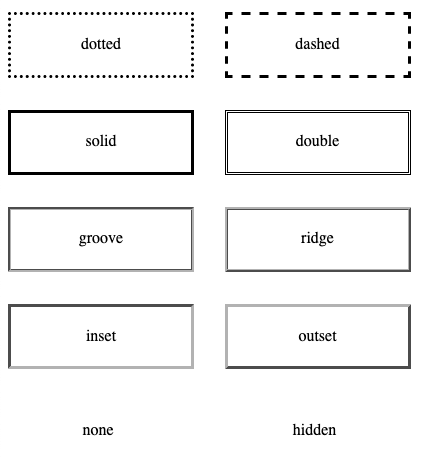
All the other types of the border-style are mentioned below -
- none - No border is displayed.
- solid - A solid line border.
- dashed - A dashed line border.
- dotted - A dotted line border.
- double - A double line border.
- groove - A 3D grooved border.
- ridge - A 3D ridged border.
- inset - A 3D inset border.
- outset - A 3D outset border.
border-width
This property sets the width of the border. You can specify it using various units like pixels (px), ems (em), or percentages (%).
The syntax for including the border-width in the HTML Document is mentioned below -
border-width: 2px;
border-color
This property sets the color of the border. You can use color names (e.g., red, blue), hexadecimal codes (e.g., #FF0000), or RGB values (e.g., rgb(255, 0, 0)).
The syntax for including the border-color in the HTML Document is mentioned below -
border-color: red;
These properties can also be combined into the shorthand border property, where you can specify the style, width, and color in a single declaration.
The code showing the same thing is mentioned below -
border: 2px solid red;
Additionally, CSS provides more specific border-related properties, such as border-radius (to create rounded borders), border-image (to use an image as the border), and border-collapse (to control the behavior of borders in table elements).
The code showing the border properties is mentioned below -
div { border-style: solid; border-width: 1px; border-color: #000000; }
Library
WEB DEVELOPMENT
Basic
HTML - Hyper Text Markup Language
CSS - Cascading Style Sheets
Cascading Style Sheets (CSS)
Selectors and Combinators
CSS Transforms
Units
CSS Icons and Colors
CSS Borders
CSS Margin
CSS Padding
CSS Dimensions
CSS Box Model
CSS Background
Pseudo Classes in CSS
CSS Positions
CSS Flexbox
Responsiveness in CSS
CSS Transitions
CSS Animations
Other CSS Properties
Var()
CSS Frameworks
CSS Grids
CSS Display Properties
JavaScript
Frontend
Backend
Interview Questions
FAANG QUESTIONS
On this page
border-style
border-width
border-color