



Cascading Style Sheets (CSS)

Published by
sanya sanya
CSS: Introduction
CSS is abbreviated as Cascading Style Sheet which is a styling language used for styling the HTML Documents. However, the concept of CSS Can be understood with a simple example.
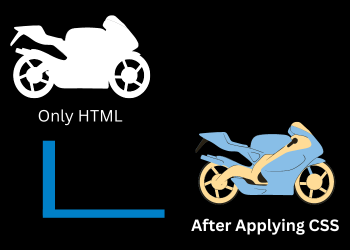
For instance, Mukesh purchased a bike with no color and no design. So, Mukesh has the convenience to style it accordingly, by applying colors, textures, and so on.
An important point to be noted regarding the CSS is that it is not the programming Language and hence, can be used only for styling purposes.
Why CSS?
One thing that needs to know about CSS, is that CSS is not compulsory for creating a webpage. However, to make the webpage interactive and stylish, CSS is mandatory.
Some important uses of CSS are mentioned below -
- Good User Interface - CSS is used to make a webpage or website Interactive and results in providing a good user Interface.
- Responsive Design - CSS Provides Responsive designs which will provide a Proper User Interface on any of the devices.
- Easy Maintenance - CSS Code is easy to maintain as it groups the elements and we can edit multiple tags using single edit.
How to Add CSS?
There are three ways of adding or including CSS to the Hyper Text Markup Language Document.
- Inline CSS - The `Inline CSS` is the method in which the CSS can be assigned to an element tag within the element. It is the least recommended way to use CSS. For instance;
- Internal CSS - The `Internal CSS` is the method in which we insert `style` in the head of the HTML Document. It is more recommended than the Inline CSS. For instance;
<style>#hello{ color: green; text-align: center; text-decoration: none; } </style> <h1 id="hello"> Code Skiller<h1>
- External CSS -The `External CSS` is the most recommended way of adding CSS in which we create a separate CSS file and link it to the HTML Document using the "link" tag as mentioned below.
<link rel="stylesheet" href="styles.css">
<h1 style="color: blue">Code Skiller<h1>
Library
WEB DEVELOPMENT
Basic
HTML - Hyper Text Markup Language
CSS - Cascading Style Sheets
Cascading Style Sheets (CSS)
Selectors and Combinators
CSS Transforms
Units
CSS Icons and Colors
CSS Borders
CSS Margin
CSS Padding
CSS Dimensions
CSS Box Model
CSS Background
Pseudo Classes in CSS
CSS Positions
CSS Flexbox
Responsiveness in CSS
CSS Transitions
CSS Animations
Other CSS Properties
Var()
CSS Frameworks
CSS Grids
CSS Display Properties
JavaScript
Frontend
Backend
Interview Questions
FAANG QUESTIONS
On this page
CSS: Introduction
Why CSS?
How to Add CSS?