



Basic and Advanced JavaScript Questions

Published by
sanya sanya
Part 1: Basic Concepts
1 . What is JavaScript, and how is it different from Java?
Answer: JavaScript is a lightweight, interpreted programming language primarily used for web development to create interactive effects within web browsers. Java is a standalone, compiled, object-oriented programming language used for building standalone applications. JavaScript is dynamically typed and interpreted, while Java is statically typed and compiled.
This simple example demonstrates JavaScript’s dynamic typing and its ability to manipulate web content.
let message = "Hello, World!"; // No data type declaration (dynamic typing)
console.log(message); // Output: Hello, World!

message = 42; // No error; JavaScript allows changing variable type
console.log(message); // Output: 42
2 . What are the different data types in JavaScript?
-
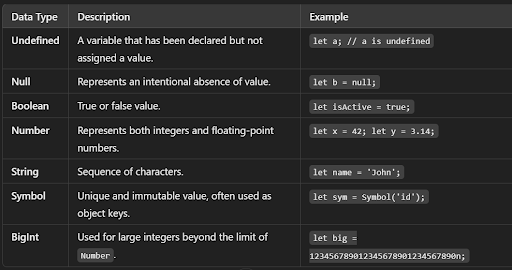
Answer: Primitive types: Undefined, Null, Boolean, Number, String, Symbol, and BigInt.
-
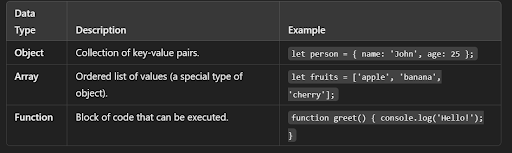
Non-primitive types: Object (including arrays, functions, and other objects).
Primitive Data Types
Non-Primitive (Reference) Data Types These data types store collections of values or more complex entities.
3 Explain the concept of closures in JavaScript.
Answer: A closure is a function that has access to its own scope, the scope of the outer function, and the global scope. Closures are created whenever a function is created, allowing the function to access variables from an enclosing scope even after the outer function has returned.
function createIncrementer() {
  let count = 0;  // This variable is captured by the closure
  return function increment() {
    count++;
    console.log(count);  // The inner function has access to `count`
  };
}

const increment = createIncrementer();

increment();  // Output: 1
increment();  // Output: 2
increment();  // Output: 3
4 . What is the difference between let, const, and var?
Answer: var is function-scoped and can be re-declared and updated within its scope. let is block-scoped and can be updated but not re-declared within its scope. const is block-scoped and cannot be updated or re-declared within its scope. It must be initialized during the declaration.
function example() {
  var x = 1;
  if (true) {
    var x = 2; // `var` allows re-declaration in the same scope
    console.log(x); // Output: 2
  }
  console.log(x); // Output: 2 (because `var` is function-scoped)
}

example();

function blockScopeExample() {
  let y = 1;
  if (true) {
    let y = 2; // `let` is block-scoped, so this `y` is different
    console.log(y); // Output: 2
  }
  console.log(y); // Output: 1 (because the `let` variable is block-scoped)
}

blockScopeExample();

function constExample() {
  const z = 1;
  if (true) {
    // const z = 2; // This would throw an error: `z` can't be re-declared
    console.log(z); // Output: 1
  }
}

constExample();
5 . What is the purpose of this keyword in JavaScript?
Answer: The this keyword refers to the object that is currently executing the code. Its value depends on the context in which a function is called:
In a method, this refers to the owner object. Alone, this refers to the global object (in strict mode, it is undefined).
In a function, this refers to the global object (in strict mode, it is undefined).
In an event, this refers to the element that received the event.
// Example 1: In a method
const person = {
  name: 'John',
  greet: function() {
    console.log(this.name); // 'this' refers to the person object
  }
};
person.greet();  // Output: John

// Example 2: Alone
function showThis() {
  console.log(this); // In non-strict mode, 'this' refers to the global object (Window in browsers)
}
showThis();  // Output: Window (in browsers)

'use strict';
function showThisStrict() {
  console.log(this); // In strict mode, 'this' is undefined
}
showThisStrict();  // Output: undefined

// Example 3: In an event
const button = document.querySelector('button');
button.addEventListener('click', function() {
  console.log(this); // 'this' refers to the button element that triggered the event
});
6 Explain the event loop in JavaScript.
Answer: The event loop is a mechanism that handles the execution of multiple chunks of JavaScript code, including handling asynchronous code. It works by continually checking the message queue and executing the oldest task in the queue, enabling non-blocking behavior and allowing asynchronous operations like setTimeout, Promises, and async/await to be executed without blocking the main thread.
console.log("Start");

setTimeout(function() {
  console.log("Inside setTimeout");
}, 0);

console.log("End");

Output

Start
End
Inside setTimeout
7 . What are Promises in JavaScript, and how do they work?
Answer: Promises are objects representing the eventual completion or failure of an asynchronous operation. A Promise can be in one of three states: pending, fulfilled, or rejected. They provide methods like then(), catch(), and finally() to handle the outcome of the asynchronous operation and to chain multiple asynchronous calls.
let myPromise = new Promise(function(resolve, reject) {
  let success = true; // Change to false to simulate failure

  if (success) {
    resolve("The operation was successful!");
  } else {
    reject("The operation failed!");
  }
});

// Handling the outcome using then() and catch()
myPromise
  .then(function(result) {
    console.log(result);  // If resolved, logs "The operation was successful!"
  })
  .catch(function(error) {
    console.log(error);  // If rejected, logs "The operation failed!"
  })
  .finally(function() {
    console.log("The operation has completed.");  // Always runs, regardless of success or failure
  });
8. What is hoisting in JavaScript?
Answer: Hoisting is JavaScript's default behaviour of moving declarations to the top of their scope before code execution. This means that variable and function declarations can be used before they are declared in the code. However, variables declared with let and const are not hoisted
console.log(x);  // Output: undefined
var x = 5;

myFunction();  // Output: "Hello from function!"

function myFunction() {
  console.log("Hello from function!");
}
9 . Explain the difference between == and === in JavaScript.
Answer: == is the equality operator that performs type coercion before comparing, meaning it converts the operands to the same type before comparison. === is the strict equality operator that does not perform type coercion and compares both the value and the type.
console.log(5 == '5');  // true because '5' is converted to number
console.log(5 === '5'); // false because types are different (number vs string)

console.log(0 == false);  // true because false is coerced to 0
console.log(0 === false); // false because types are different (number vs boolean)

console.log(null == undefined);  // true because both are considered loosely equal
console.log(null === undefined); // false because they are different types
10 . What is the purpose of the async and await keywords in JavaScript?
Answer: The async keyword is used to declare an asynchronous function, which implicitly returns a Promise. The await keyword is used inside an async function to pause execution until the Promise is resolved, allowing for writing asynchronous code in a synchronous-like manner.
// Function returning a promise that resolves after 2 seconds
function fetchData() {
  return new Promise(resolve => {
    setTimeout(() => {
      resolve("Data fetched successfully");
    }, 2000);
  });
}

// Async function that uses await
async function getData() {
  try {
    console.log("Fetching data...");
    const result = await fetchData(); // Wait for the promise to resolve
    console.log(result);  // Logs: Data fetched successfully
  } catch (error) {
    console.log("Error:", error);
  }
}

getData();  // Call the async function
11 What is the use of the isNaN function?
Answer: The number isNan function determines whether the passed value is NaN (Not a number) and is of the type “Number”. In JavaScript, the value NaN is considered a type of number. It returns true if the argument is not a number, else it returns false.
console.log(isNaN(123));          // false, because 123 is a valid number
console.log(isNaN('Hello'));      // true, because 'Hello' is not a number
console.log(isNaN(NaN));          // true, because NaN is Not-a-Number
console.log(isNaN('123'));        // false, because '123' can be coerced to a number
console.log(isNaN('123abc'));     // true, because '123abc' cannot be coerced to a number
console.log(isNaN(undefined));    // true, because undefined cannot be coerced to a valid number
12 What are the types of Pop up boxes available in JavaScript?
Answer: There are three types of pop boxes available in JavaScript.
alert(): Displays a message in a pop-up alert box. It’s often used for simple notifications or debugging.
confirm(): Shows a dialog box with a message and OK/Cancel buttons. It returns true if OK is pressed, or false if Cancel is pressed, often used for user confirmation.
prompt(): Opens a dialog box that prompts the user to input some text. It returns the user’s input as a string, or null if Cancel is pressed.
- Alert box: Display a simple message
alert("Welcome to the JavaScript pop-up box example!");
- Confirm box: Ask for user confirmation
let userConfirmed = confirm("Do you want to continue?");
if (userConfirmed) {
  console.log("User clicked OK. Proceeding with the next step.");
- Prompt box: Ask for user input
 let userName = prompt("Please enter your name:");
  if (userName !== null && userName !== "") {
    console.log("Hello, " + userName + "! Nice to meet you.");
  } else {
    console.log("User didn't provide a name.");
  }

} else {
  console.log("User clicked Cancel. Exiting the process.");
}
13 What is the difference between an alert box and a confirmation box?
Answer: An alert box will display only one button which is the OK button. It is used to inform the user about the agreement has to agree. But a Confirmation box displays two buttons OK and cancel, where the user can decide to agree or not.
14 What is the disadvantage of using innerHTML in JavaScript?
Answer: There are lots of disadvantages of using the innerHTML in JavaScript as the content will replace everywhere. If you use += like “innerHTML = innerHTML + ‘html’” still the old content is replaced by HTML. It preserves event handlers attached to any DOM elements.
let button = document.getElementById("myButton");
button.addEventListener("click", function() { alert("Clicked!"); });

// After using innerHTML, the button is replaced, and the event handler is lost.
document.getElementById("myDiv").innerHTML = "<button id='myButton'>Click Me</button>";

let userInput = '<img src="x" onerror="alert(1)">';
document.getElementById("myDiv").innerHTML = userInput;  // Dangerous if userInput is not sanitized
15 What is the difference between a method and a function in JavaScript?
Answer: In JavaScript, a function is a standalone block of code, while a method is a function that is a property of an object. Methods are invoked on objects and can access and manipulate the object's properties.
16 What is callback hell and how can you avoid it?
Answer: Callback hell, also known as "Pyramid of Doom," occurs when multiple nested callbacks create deeply indented and hard-to-maintain code. To avoid it, use techniques like promises, async/await, or modularize code with named functions to improve readability and manageability.
console.log("Start");

setTimeout(() => {
  console.log("Task 1");

  setTimeout(() => {
    console.log("Task 2");

    setTimeout(() => {
      console.log("Task 3");

      setTimeout(() => {
        console.log("Task 4");

        setTimeout(() => {
          console.log("Task 5");
        }, 1000);

      }, 1000);

    }, 1000);

  }, 1000);

}, 1000);

console.log("End");


Start
End
Task 1
Task 2
Task 3
Task 4
Task 5
Part 2: Advanced Concepts
1 . What are the different ways to create objects in JavaScript?
Answer: Objects in JavaScript can be created in several ways:
1. Using Object Literals
const obj = {

name: 'John',
 age: 30
}
2. Using the new Object() Syntax
const obj = new Object()
{
obj.name='John';

obj.age = 30;

};
3. Using a Constructor Function
function Person(name, age) {
  this.name = name;
  this.age = age;
}

const person1 = new Person('John', 30);
const person2 = new Person('Jane', 25);

console.log(person1.name); // Output: John
console.log(person2.age);  // Output: 25
4. Using Object.create()
const prototypeObj = {
  greet() {
    console.log('Hello');
  }
};

const obj = Object.create(prototypeObj);
obj.name = 'John';
obj.age = 30;

obj.greet(); // Output: Hello
console.log(obj.name); // Output: John
5. Using ES6 Classes
  class Person {
  constructor(name, age) {
    this.name = name;
    this.age = age;
  }

  greet() {
    console.log(Hello, my name is ${this.name});
  }
}

const person1 = new Person('John', 30);
const person2 = new Person('Jane', 25);

person1.greet(); // Output: Hello, my name is John
person2.greet(); // Output: Hello, my name is Jane
2 What is the difference between call(), apply(), and bind()?
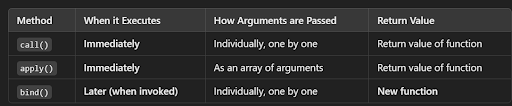
Answer:
call(): Invokes a function with a specified this value and arguments provided individually.
apply(): Invokes a function with a specified this value and arguments provided as an array.
bind(): Returns a new function with a specified this value and optional arguments. The new function can be invoked later.
const person = {
  fullDetail: function(city) {
    return `${this.firstName} ${this.lastName} lives in ${city}`;
  },
};
const newPerson = {
  firstName: "Tushar",
  lastName: "Satija",
};
Using call() - Pass arguments one by one
const callResult = person.fullDetail.call(newPerson, "Faridabad");
console.log(callResult);
Output:
Tushar Satija lives in Faridabad
Using apply() - Pass arguments as an array
const applyResult = person.fullDetail.apply(newPerson, ["Faridabad"]);
console.log(applyResult);
Output:
Tushar Satija lives in Faridabad
Using bind() - Create a new function that can be called later
const boundFunction = person.fullDetail.bind(newPerson, "Faridabad");
const bindResult = boundFunction();
console.log(bindResult);
Output:
Tushar Satija lives in Faridabad
3 What is event delegation in JavaScript?
Answer: Event delegation is a technique where a single event listener is added to a parent element to manage events for multiple child elements. This is efficient because it reduces the number of event listeners attached to the DOM and utilizes event propagation (bubbling).
Get reference to the parent element
const parentList = document.getElementById('parentList');
Event Delegation Logic
parentList.addEventListener('click', function(event) {
  // Check if the clicked element is an <li> tag
  if (event.target.tagName === 'LI') {
    console.log(`You clicked on ${event.target.textContent}`);
  }
});
Logic to Add New Items Dynamically
const addItemButton = document.getElementById('addItem');
addItemButton.addEventListener('click', function() {
  // Create a new <li> element
  const newItem = document.createElement('li');
  newItem.textContent = `Item ${parentList.children.length + 1}`;

  // Append the new item to the parent list
  parentList.appendChild(newItem);
});
4 . What are higher-order functions in JavaScript?
Answer: Higher-order functions are functions that can take other functions as arguments or return them as results. Examples include map(), filter(), and reduce()
const numbers = [1, 2, 3, 4, 5];
map() - Create a new array with each element doubled
const doubled = numbers.map((num) => num * 2);
console.log(doubled);
Output:
[2, 4, 6, 8, 10]
filter() - Create a new array with only even numbers
const evens = numbers.filter((num) => num % 2 === 0);
console.log(evens);
Output:
[2, 4]
reduce() - Calculate the sum of the array
const sum = numbers.reduce((acc, num) => acc + num, 0);
console.log(sum);
Output:
15
5 .Explain the concept of prototypal inheritance in JavaScript.
Answer: Prototypal inheritance is a feature in JavaScript where objects can inherit properties and methods from other objects. Each object has a [[Prototype]] internal property that points to another object, and this chain of references forms the prototype chain. Properties and methods are looked up along this chain if they are not found on the object itself.
function explainPrototypes() {
    // Objects
    let obj = {};
    console.log("Object Prototype:", obj.__proto__ === Object.prototype); // true

    // Arrays
    let arr = [];
    console.log("Array Prototype:", arr.__proto__ === Array.prototype); // true
    console.log("Array -> Object:", arr.__proto__.__proto__ === Object.prototype); // true

    // Strings
    let str = "hello";
    console.log("String Prototype:", str.__proto__ === String.prototype); // true
    console.log("String -> Object:", str.__proto__.__proto__ === Object.prototype); // true

    // Numbers
    let num = 42;
    console.log("Number Prototype:", num.__proto__ === Number.prototype); // true
    console.log("Number -> Object:", num.__proto__.__proto__ === Object.prototype); // true

    // Booleans
    let bool = true;
    console.log("Boolean Prototype:", bool.__proto__ === Boolean.prototype); // true
    console.log("Boolean -> Object:", bool.__proto__.__proto__ === Object.prototype); // true

    // Functions
    let func = function() {};
    console.log("Function Prototype:", func.__proto__ === Function.prototype); // true
    console.log("Function -> Object:", func.__proto__.__proto__ === Object.prototype); // true

    // Object.prototype -> null (End of the chain)
    console.log("Object.prototype -> null:", Object.prototype.__proto__ === null); // true
}

explainPrototypes();
6 . What is the difference between null and undefined?
Answer: undefined indicates a variable has been declared but not assigned a value. null is an assignment value that represents no value or an empty value.
let x;               // x is declared but not assigned, so it's undefined
let y = null;        // y is explicitly set to null

console.log(x);  // Output: undefined
console.log(y);  // Output: null
7 . What is a callback function?
Answer: A callback function is a function passed into another function as an argument to be executed later. Callbacks are used to handle asynchronous operations, such as fetching data from a server.
function fetchData(callback) {
  setTimeout(() => {
    console.log("Data fetched!");
    callback();  // Call the callback after data is fetched
  }, 2000);
}

function processData() {
  console.log("Processing data...");
}

// Calling fetchData with processData as the callback
fetchData(processData);
8.Explain Promise.all and Promise.race in JavaScript.
Answer:
Promise.all(): Takes an array of promises and returns a single promise that resolves when all the promises resolve or rejects when any promise rejects.
Promise.race(): Takes an array of promises and returns a single promise that resolves or rejects as soon as any of the promises resolve or reject.
const promise1 = new Promise((resolve) => setTimeout(resolve, 100, 'Resolved first'));
const promise2 = new Promise((resolve, reject) => setTimeout(reject, 200, 'Rejected second'));
const promise3 = new Promise((resolve) => setTimeout(resolve, 300, 'Resolved third'));

// Using Promise.race() (The first to settle wins)
console.log('Using Promise.race:');
Promise.race([promise1, promise2, promise3])
  .then((value) => {
    console.log('Promise.race resolved with:', value);  // Output will be 'Resolved first' since it resolves first
  })
  .catch((error) => {
    console.log('Promise.race rejected with:', error);  // This will not be triggered since promise1 resolves first
  });

// Using Promise.all() (All promises need to resolve, or one rejection will cause it to fail)
console.log('Using Promise.all:');
Promise.all([promise1, promise2, promise3])
  .then((values) => {
    console.log('Promise.all resolved:', values);  // This will not run because promise2 rejects
  })
  .catch((error) => {
    console.log('Promise.all rejected:', error);  // Output: 'Rejected second' because promise2 rejects
  });
9 . What are template literals in JavaScript?
Answer: Template literals are string literals allowing embedded expressions. They are enclosed by backticks (`) and can contain placeholders indicated by ${expression}. Template literals support multi-line strings and string interpolation.
const firstName = "Tushar";
const lastName = "Satija";

// Using template literals for string interpolation
const greeting = `Hello, my name is ${firstName} ${lastName}.`;

console.log(greeting);
Output:
Hello, my name is Tushar Satija.
10. What is the spread operator, and how is it used?
Answer: The spread operator (...) allows an iterable (e.g., an array) to be expanded in places where zero or more arguments or elements are expected. It can be used to copy arrays, merge arrays, and pass elements of an array as arguments to a function.
Copying Arrays - Using spread operator to create a copy of an array
const arr1 = [1, 2, 3];
const arr2 = [...arr1];  // Copying arr1 into arr2
console.log("Array Copy:", arr2);
Output:
[1, 2, 3]
Merging Arrays - Using spread operator to merge two arrays
const arr3 = [4, 5];
const mergedArr = [...arr1, ...arr3];  // Merging arr1 and arr3
console.log("Merged Arrays:", mergedArr);
Output:
[1, 2, 3, 4, 5]
Passing Elements as Arguments - Using spread operator to pass array elements as function arguments
const numbers = [1, 2, 3];
function sum(a, b, c) {
  return a + b + c;
}
console.log("Sum:", sum(...numbers));
Output:
6
Copying Objects - Using spread operator to copy properties of an object
const person = { name: 'Tushar', age: 25 };
const copyPerson = { ...person };  // Copying person into copyPerson
console.log("Object Copy:", copyPerson);
Output:
{ name: 'Tushar', age: 25 }
Merging Objects - Using spread operator to merge two objects
const contact = { email: '[email protected]' };
const mergedObject = { ...person, ...contact };  // Merging person and contact objects
console.log("Merged Objects:", mergedObject);
Output:
{ name: 'Tushar', age: 25, email: '[email protected]' }
11 What is the DOM, and how does JavaScript interact with it?
Answer: The DOM (Document Object Model) is a programming interface for HTML and XML documents. It represents the document as a tree structure where each node is an object representing a part of the document. JavaScript can interact with the DOM to manipulate the structure, style, and content of web pages.
Access the DOM elements
const heading = document.getElementById('heading');
const paragraph = document.getElementById('paragraph');
const button = document.getElementById('changeTextButton');

// Change the content of the heading
heading.innerHTML = 'Welcome to JavaScript DOM Manipulation';

// Change the style of the paragraph
paragraph.style.color = 'blue';

// Add an event listener to the button
button.addEventListener('click', function() {
  // Change the paragraph text when the button is clicked
  paragraph.innerHTML = 'You clicked the button!';
});
12 How do you add an element to the DOM?
Answer: You can add an element to the DOM using methods like document.createElement(), appendChild(), insertBefore(), or by manipulating innerHTML. Example:
const newDiv = document.createElement('div');
newDiv.textContent = 'Hello, World!';
document.body.appendChild(newDiv);
13 What is event bubbling and capturing?
Answer: Event bubbling and capturing are two phases of event propagation in the DOM:
Event bubbling: The event starts from the target element and bubbles up to the root, triggering event handlers in that order.
Event capturing: The event starts from the root and captures down to the target element, triggering event handlers in that order.
// Event Bubbling: Start from the target (child) and bubble up to the root (parent)
document.getElementById('child').addEventListener('click', function(event) {
  console.log('Child clicked - Bubbling');
}, false); // false for bubbling phase

document.getElementById('parent').addEventListener('click', function(event) {
  console.log('Parent clicked - Bubbling');
}, false); // false for bubbling phase

// Event Capturing: Start from the root (parent) and capture down to the target (child)
document.getElementById('parent').addEventListener('click', function(event) {
  console.log('Parent clicked - Capturing');
}, true); // true for capturing phase

document.getElementById('child').addEventListener('click', function(event) {
  console.log('Child clicked - Capturing');
}, true); // true for capturing phase
14 How do you prevent event propagation in JavaScript?
Answer: You can prevent event propagation using event.stopPropagation() to stop the event from bubbling or capturing further. To prevent default behavior, use event.preventDefault().
Example of preventing event propagation
document.getElementById('child').addEventListener('click', function(event) {
  console.log('Child clicked');
  event.stopPropagation(); // Prevent event from bubbling up
});
Example of preventing default behavior
document.getElementById('link').addEventListener('click', function(event) {
  console.log('Link clicked');
  event.preventDefault(); // Prevent the default behavior (e.g., navigation)
});
15 What are generator functions in JavaScript?
Answer: Generator functions are a special type of function that can be paused and resumed.
They are declared using the function* syntax and use the yield keyword to yield values.
Generators return an iterator object that can be used to control the function's execution
Generator function
function* myGenerator() {
  yield 1;
  yield 2;
  yield 3;
}
Creating a generator object
const generator = myGenerator();
Iterating through the yielded values
console.log(generator.next().value); // 1
console.log(generator.next().value); // 2
console.log(generator.next().value); // 3
console.log(generator.next().value); // undefined (No more values)
16 What is the difference between synchronous and asynchronous code?
Answer: Synchronous code is executed sequentially, blocking the execution of subsequent code until the current task is complete. Asynchronous code allows multiple operations to run concurrently, using mechanisms like callbacks, promises, and async/await to handle tasks that may take time (e.g., network requests).
console.log('Start');

// Synchronous code
console.log('Middle');

// Asynchronous code
setTimeout(() => {
  console.log('Asynchronous Task');
}, 2000); // Simulating an async operation (e.g., network request)

console.log('End');
Output:
Start
Middle
End
Asynchronous Task
17 Explain the purpose of the fetch API.
Answer: The fetch API is a modern interface for making network requests. It returns a Promise that resolves to the Response object representing the response to the request. It simplifies and replaces older methods like XMLHttpRequest.
Making a GET request using the fetch API
fetch('https://jsonplaceholder.typicode.com/posts')
  .then(response => {
    // Check if the response is successful
    if (!response.ok) {
      throw new Error('Network response was not ok');
    }
    // Parse the JSON data from the response
    return response.json();
  })
  .then(data => {
    // Handle the data (e.g., logging it to the console)
    console.log(data);
  })
  .catch(error => {
    // Handle any errors
    console.error('There was a problem with the fetch operation:', error);
  });
18 What is a proxy in JavaScript?
Answer: A proxy is an object that wraps another object (target) and intercepts operations (e.g., property access, assignment) applied to the target, allowing custom behavior via handler functions.
Target object
const target = {
  message: 'Hello, World!',
  count: 0
};
Handler object with traps for intercepting operations
const handler = {
  get: function(target, prop, receiver) {
    if (prop === 'message') {
      return target[prop].toUpperCase(); // Modify behavior for 'message' property
    }
    return prop in target ? target[prop] : 'Property not found';
  },
  set: function(target, prop, value) {
    if (prop === 'count') {
      console.log('Count is being updated!');
    }
    target[prop] = value; // Perform the normal assignment
    return true;
  }
};
Creating the proxy
const proxy = new Proxy(target, handler);

// Using the proxy
console.log(proxy.message); // "HELLO, WORLD!" (modified behavior)
proxy.count = 5; // Logs "Count is being updated!"
console.log(proxy.count); // 5
console.log(proxy.nonExistent); // "Property not found"
19 Explain the concept of reflow and repaint in the browser.
Answer: Reflow and repaint are processes that the browser performs to render the web page:
Reflow: The process of recalculating the positions and sizes of elements in the document. It happens when elements are added, removed, resized, or otherwise modified.
Repaint: The process of updating the visual appearance of elements on the screen after reflow, including changes to styles like color or visibility.
Create objects with names
let tushar = { name: 'Tushar' };
let uday = { name: 'Uday' };
let prateek = { name: 'Prateek' };
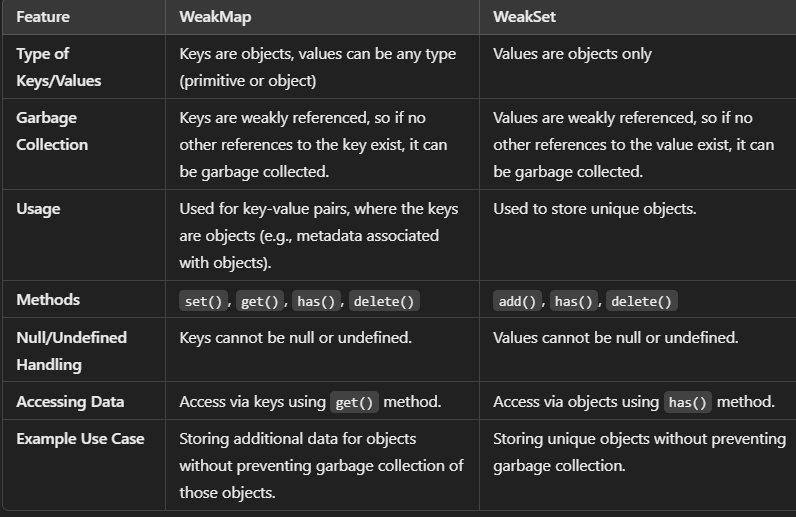
Create a WeakMap and WeakSet
const weakMap = new WeakMap();
const weakSet = new WeakSet();
Add key-value pairs to the WeakMap
weakMap.set(tushar, 'This is Tushar');
weakMap.set(uday, 'This is Uday');
weakMap.set(prateek, 'This is Prateek');
Add objects to the WeakSet
weakSet.add(tushar);
weakSet.add(uday);
weakSet.add(prateek);
Check if WeakMap contains a key and get the value
console.log(weakMap.get(tushar)); // 'This is Tushar'
console.log(weakMap.get(uday));   // 'This is Uday'
console.log(weakMap.get(prateek)); // 'This is Prateek'
Check if objects exist in the WeakSet
console.log(weakSet.has(tushar)); // true
console.log(weakSet.has(uday));   // true
console.log(weakSet.has(prateek)); // true
Simulate object removal by setting them to null
tushar = null;   // tushar is now eligible for garbage collection
uday = null;     // uday is now eligible for garbage collection
prateek = null;  // prateek is now eligible for garbage collection
The following checks will return undefined or false after garbage collection
setTimeout(() => {
  console.log(weakMap.get(tushar));  // undefined (tushar is garbage collected)
  console.log(weakSet.has(tushar));  // false (tushar is garbage collected)
  console.log(weakMap.get(uday));    // undefined (uday is garbage collected)
  console.log(weakSet.has(uday));    // false (uday is garbage collected)
  console.log(weakMap.get(prateek)); // undefined (prateek is garbage collected)
  console.log(weakSet.has(prateek)); // false (prateek is garbage collected)
}, 1000);
20 What is a Symbol in JavaScript?
Answer: A Symbol is a unique and immutable primitive value introduced in ES6. Symbols are used to create unique property keys that do not conflict with other property keys.
Creating Symbols
const symbol1 = Symbol('description1');
const symbol2 = Symbol('description2');
Using Symbols as object keys
const obj = {
  [symbol1]: 'Value for symbol1',
  [symbol2]: 'Value for symbol2'
};
console.log(obj[symbol1]); // 'Value for symbol1'
console.log(obj[symbol2]); // 'Value for symbol2'
Symbol values are unique
console.log(symbol1 === symbol2); // false
Using Symbol.for to share Symbols globally
const globalSymbol1 = Symbol.for('shared');
const globalSymbol2 = Symbol.for('shared');

console.log(globalSymbol1 === globalSymbol2); // true
21 How do you debounce a function in JavaScript?
Answer: Debouncing is a technique to limit the rate at which a function executes. It ensures that a function is only called after a specified delay period following the last invocation. Here is an example implementation:
function debounce(func, wait) {
  let timeout;
  return function(...args) {
    clearTimeout(timeout);
    timeout = setTimeout(() => func.apply(this, args), wait);
  };
}
22. Explain the concept of microtasks and macrotasks in JavaScript.
Answer: Microtasks and macrotasks are types of tasks in JavaScript's event loop:
Microtasks: Include tasks like promises and MutationObserver callbacks. They are executed immediately after the currently executing script and before any macrotasks.
Macrotasks: Include tasks like setTimeout, setInterval, and I/O operations. They are executed after all microtasks have been processed.
console.log('Start'); // Step 1: Executes first

setTimeout(() => {
  console.log('Macrotask 1'); // Step 4: Executes after microtasks
}, 0);

Promise.resolve().then(() => {
  console.log('Microtask 1'); // Step 2: Executes after synchronous code
});

Promise.resolve().then(() => {
  console.log('Microtask 2'); // Step 3: Executes after Microtask 1
});

console.log('End'); // Step 1: Executes first
23. What is the purpose of the Promise.allSettled() method?
Answer: The Promise.allSettled() method takes an array of Promises and returns a Promise that resolves when all the input Promises have settled (either resolved or rejected). The resulting Promise resolves to an array of objects describing the outcome of each Promise.
const promise1 = Promise.resolve(3);
const promise2 = Promise.reject('Error');
const promise3 = new Promise(resolve => setTimeout(resolve, 100, 'Hello'));

Promise.allSettled([promise1, promise2, promise3])
  .then(results => {
    results.forEach(result => {
      if (result.status === 'fulfilled') {
        console.log('Fulfilled with value:', result.value);
      } else {
        console.log('Rejected with reason:', result.reason);
      }
    });
  });
24. Why do we use the word “debugger” in javascript?
Answer: The debugger statement in JavaScript pauses code execution and triggers the browser's debugger, allowing developers to inspect and troubleshoot code by stepping through it and examining its state.
function calculateTotal(a, b) {
  let total = a + b;
  debugger; // Execution will pause here
  return total;
}

console.log(calculateTotal(5, 10)); // The debugger will pause at this line
25. What is the ‘Strict’ mode in JavaScript and how can it be enabled?
Answer: Strict Mode is a new feature in ECMAScript 5 that allows you to place a program or a function in a “strict” operating context. This strict context prevents certain actions from being taken and throws more exceptions. The statement “use strict” instructs the browser to use the Strict mode, which is a reduced and safer feature set of JavaScript.
"use strict";  // Enables strict mode for the entire script

x = 10;  // Error: x is not declared, strict mode prevents it
In this example, x is used without being declared, and strict mode will throw an error.
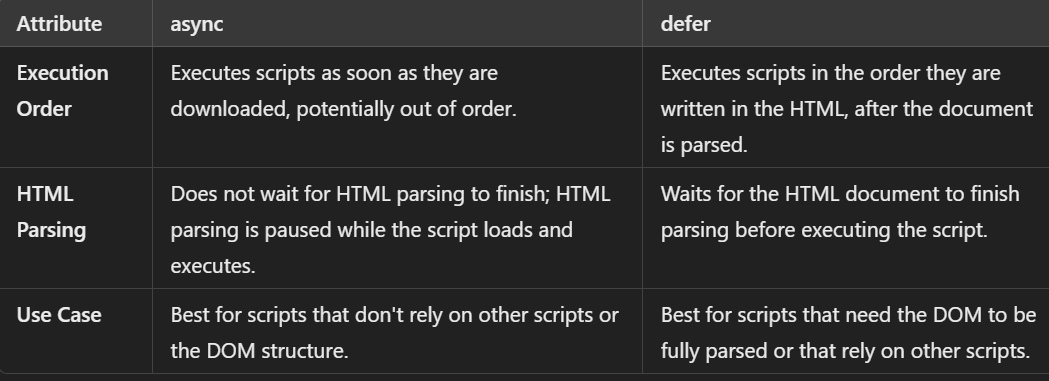
26. Difference between async and defer attribute
Answer The async attribute loads and executes scripts immediately, potentially out of order. The defer attribute loads scripts in order and executes them after HTML parsing is complete.
27. Explain the concept of "tail call optimization".
Answer Tail call optimization (TCO) is a technique where the last function call in a function (the tail call) is optimized to avoid adding a new stack frame, improving performance and preventing stack overflow in recursive functions.
function sum(n, accumulator = 0) {
  if (n <= 0) {
    return accumulator; // Base case
  }
  return sum(n - 1, accumulator + n); // Tail call
}

console.log(sum(100000)); // No stack overflow
In the above example, if tail call optimization is applied, the recursive calls will not increase the call stack, and the function can safely execute even with a large value of n
28. Explain the concept of "truthy" and "falsy" values in JavaScript.
Answer: In JavaScript, "truthy" values evaluate to true in a boolean context (e.g., non-zero numbers, non-empty strings), while "falsy" values evaluate to false (e.g., 0, "", null, undefined, NaN, false).
if (false) {
  console.log("This won't execute.");
}
if (0) {
  console.log("This won't execute either.");
}
if ("") {
  console.log("Empty string is falsy, so this won't execute.");
}

if (true) {
  console.log("This will execute.");
}
if (1) {
  console.log("This will execute because 1 is truthy.");
}
if ("hello") {
  console.log("Non-empty strings are truthy, so this will execute.");
}
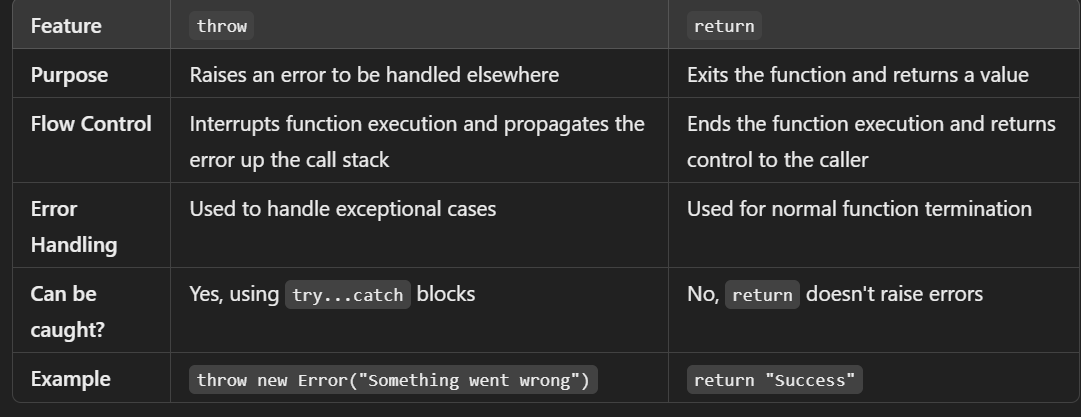
29. What is the difference between throw and return in error handling?
Answer: In error handling, throw is used to raise an exception, interrupting the current function's execution and propagating the error up the call stack, while return exits the function and provides a value without raising an exception.
function divide(a, b) {
  // Using return to handle non-error cases
  if (b === 0) {
    return "Division by zero is not allowed";  // Returning a message instead of throwing an error
  }
  // Using throw to raise an error for any unexpected cases
  if (isNaN(a) || isNaN(b)) {
    throw new Error("Both arguments must be numbers");
  }

  return a / b;  // Returning the result of division
}

try {
  console.log(divide(5, 2));   // Output: 2.5
  console.log(divide(5, 0));   // Output: Division by zero is not allowed
  console.log(divide(5, 'a')); // Throws an error
} catch (error) {
  console.log(error.message);  // Output: Both arguments must be numbers
}
30. What is the difference between proto and prototype?
Answer: proto is an internal property pointing to an object's prototype, used for inheritance, while prototype is a property of constructor functions that defines the prototype object for instances created by that constructor.
Constructor function to create Person objects
function Person(name) {
  this.name = name;
}
Adding a method to the Person constructor's prototype
Person.prototype.sayHello = function() {
  console.log(`Hello, my name is ${this.name}`);
};
Create an instance of Person
const person1 = new Person("Alice");
Accessing the prototype of the person1 object using proto
console.log(person1.__proto__); // Logs: Person { sayHello: [Function] }
Call the sayHello method from the prototype
person1.sayHello();
Output:
Hello, my name is Alice
Checking the prototype chain using proto
console.log(person1.__proto__ === Person.prototype);
Output:
True
Checking the prototype of Person function itself
console.log(Person.prototype.constructor === Person);
Output:
True
31. Can you modify the prototype of an existing object?
Answer: Yes, you can modify the prototype of an existing object using Object.setPrototypeOf(). However, this is generally discouraged for performance reasons and can lead to unexpected behavior.
const obj = {
  name: 'Tushar',
  greet() {
    console.log(`Hello, ${this.name}`);
  }
};


const newPrototype = {
  greet() {
    console.log(`Hi, ${this.name}`);
  },
  sayGoodbye() {
    console.log(`Goodbye, ${this.name}`);
  }
};
Modify the prototype of obj
Object.setPrototypeOf(obj, newPrototype);
Calling methods from the new prototype
obj.greet();
Output:
Hi, Tushar
obj.sayGoodbye();
Output:
Goodbye, Tushar
32. What are some common pitfalls of prototypal inheritance?
Answer: Common pitfalls of prototypal inheritance include shared references causing unintended side effects, prototype pollution affecting all objects, performance issues with dynamic prototype changes, and complexity in managing and debugging prototype chains.
- Shared References Issue
function Person(name) {
  this.name = name;
}
Method shared by all instances
Person.prototype.friends = [];

const person1 = new Person("Tushar");
const person2 = new Person("Uday");
Modify person1's friends list
person1.friends.push("Prateek");

console.log(person1.friends); // Output: ["Prateek"]
console.log(person2.friends);
Output:
["Prateek"] - Shared reference issue
- Prototype Pollution
Polluting the Object prototype
Object.prototype.isValid = function() { return true; };

const obj = {};
console.log(obj.isValid()); // Output: true, even though isValid was not defined for obj
- Performance Issue (simulated in a simple example)
const obj = {};
Object.setPrototypeOf(obj, {});

console.time("setPrototypeTime");
for (let i = 0; i < 100000; i++) {
  Object.setPrototypeOf(obj, { someNewProperty: "value" });
}
console.timeEnd("setPrototypeTime"); // Performance degradation due to dynamic prototype changes
- Complexity in Debugging Prototype Chains
function Animal() {}
function Dog() {}
Dog.prototype = new Animal();

const dog = new Dog();
console.log(dog instanceof Animal);
Output:
true, Dog's prototype is Animal, creating a complex chain
- Overriding Properties in Prototypes
function Person() {}
Person.prototype.greet = function() { console.log("Hello!"); };

const person = new Person();
person.greet();
Output:
"Hello!"
Overriding the greet method in the instance
person.greet = function() { console.log("Hi!"); };

person.greet();
Output:
"Hi!" - Original greet method from the prototype is lost
Library
WEB DEVELOPMENT
Basic
Frontend
Backend
Interview Questions
JavaScript Interview Questions
React Interview Questions
Application Based JS Questions
Basic and Advanced JavaScript Questions
SQL INTERVIEW QUESTIONS
PHP Interview Questions
Python Interview Questions
FAANG QUESTIONS