



' this' keyword

Published by
sanya sanya
The this keyword in javascript always refers to an object. It refers to a block of code that is executing currently. Moreover, the this keyword references the object that is currently executing the function.
For instance, Rajesh is eating a pizza slice, and when eating he said, the pizza slice is tasty. So, the pizza slice which is currently being eaten refers to the this keyword which shows the function executing at present.
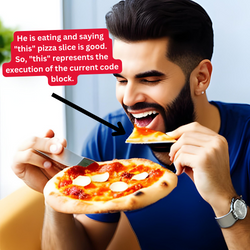
The code snippet showing the working of the this keyword is mentioned below -
function Pokemon(name) { this.name = name; } const obj = new Pokemon('Pikachu'); console.log(obj.name); // Output: Pikachu
## this keyword Binding Rules The code is written in a `lexical Environment` in which all the concepts such as logic, keyword, and so on will be fetched to give a proper input and this is known as the process of binding.
There are five binding rules supported by the this keyword in javascript. All the binding rules are described as follows -
Implicit Binding
The Implicit Binding covers most of the test cases which deal with the this keyword. Normally, we use dot notation, however, in Implicit Binding we check the object which is adjacent to the method at the execution time.
This can be understood using the code example below -
function greet(obj) { obj.message = function() { console.log(
${this.name} and ${this.age}); } }; const ash = { name: 'ash', age: 10 }; const brock = { name: 'brock', age: 20 }; greeting(ash); greeting(brock); ash. message (); brock. message ();
//Output: ash and 10 brock and 20
Explicit Binding
As we know, Javascript runs the code in the lexical environment. It takes care of the memory allocation in the program at runtime which is also known as the Execution phase.
Most importantly, each execution is independent of the other in the Execution phase.
But sometimes, we require to use one execution with another and that's why we use Explicit Binding.
Three in-builts are used in implementing the explicit binding - call(), apply(), and bind().
call()
In the call() method, the context which is to be called with the function will be passed as a parameter to the call(). The code example is mentioned below -
let name = function() { console.log(this.name) } let user = { name:'Kumar', password: 'xxxxxx' } name.call(user)
//Output: Kumar
apply()
The call() method is somewhat hectic in passing the values with. This can be resolved with apply() in which we can arguments more conveniently. In apply() we can call an array of arguments, which is not supported in call().
let name = function(lang1, lang2) { console.log(this.name + " " +lang1 + " " + lang2); } let user = { name: 'Rajesh', password: 'xxxxxx'
}; let languages = ['javascript', 'nodeJS']; name.apply(user, languages);
//Output: Rajesh javascript nodeJS
bind()
The bind() function is similar to call(). However, the only function is that the bind() function invokes a new function which we can invoke instead.
The code example showing the working of the bind() is mentioned below -
let name = function(lang1, lang2) { console.log(this.name + ' ' + lang1 + ' ' + lang2); } let user = { name: 'Rajesh', password: 'xxxxxx'
}; let languages = ['Javascript', 'NodeJS']; let newFunc = name.bind(user, languages[0], languages[1]); newFunc();
//Output: Rajesh Javascript NodeJS
Binding with "new" Keyword
We can create an object from the constructor function using the new keyword.
While using a new keyword, a new method will be referred to the main function and invoked accordingly.
The code for the same is mentioned below -
let language = function(name, use) { this.name = name; this.use = use; this.log = function() { console.log(this.name + 'used for' + this.use); } }; //The object created with the
newkeyword is mentioned below - let lang1 = new language('javascript', 'web development') console.log(lang1);
//Output: language {name: 'javascript', use: 'web development', log: ƒ} log : ƒ () name : "javascript" use : "web development" [[Prototype]] : Object
Global Object Binding
When the this keyword, bind with itself, it will be bounded to the window object. The code for the same is as follows -
let name = function(name) { console.log(this.name); }; window.name = 'javascript'; name();
It is undefined when used with strict functions.
Event Element Binding
The this keyword can be used with the HTML tags with the onClick attribute to perform various tasks using this keyword. The code example for the same is mentioned below -
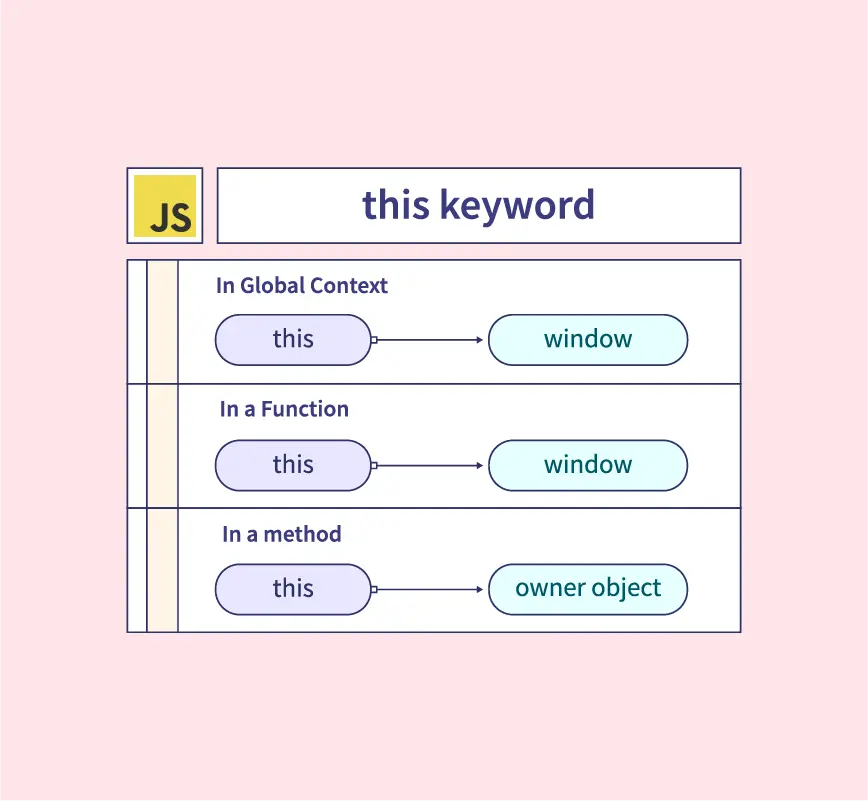
"" ##Properties of 'this' keyword There are some cases in which this keyword refers to different objects as per their usage mentioned below -
- In Object Method, the `this` keyword refers to an object. The code showing the use of `this` with the method is as follows
- When used alone, this keyword refers to the global object. For instance,
- With function also, the `this` keyword refers to the global object. Hence, the output will be again the window object mentioned below.
- In a strict mode of a function, the `this` keyword is undefined.
- In the event, it refers to the element which receives the particular event.
const pokemon = { name: "Pikachu", type: "electric" Pokedex : function() { return this. name + this.type; } };
We can use the this keyword to access the properties from the same object.
let value = this; console.log(value)
//Output: The output will be the window object. Window {0: global, window: Window, self: Window, document: document, name: '', location: Location, …}. When opening, it will collapse and several methods will be shown up.
let value = this;
console.log(value)
//Output: The output will be the window object. Window {0: global, window: Window, self: Window, document: document, name: '', location: Location, …}
let value = this; console.log(value)
//Output: The output will beundefined.
< button onclick=" this.style.display='flex'>Click me
Library
WEB DEVELOPMENT
Basic
HTML - Hyper Text Markup Language
CSS - Cascading Style Sheets
JavaScript
An Introduction to Javascript!
How to Run JavaScript Code
Variables in Javascript
Numbers in JavaScript
JavaScript Operators
Data Types in JavaScript
Conditional Statements
Switch Statements
Loops in Javascript
Arrays in JavaScript
Strings in JavaScript
Objects in JavaScript
Object Methods in JavaScript
Functions in JavaScript
Object Referencing and Copying in JavaScript
' this' keyword
Asynchronous Programming in JavaScript
Callbacks in JavaScript
Promises in JavaScript
Constructor Functions in JavaScript
Async and Await in JavaScript
Type Conversion in Javascript
DOM
Currying in JavaScript
Network Request
Frontend
Backend
Interview Questions
FAANG QUESTIONS
On this page
Implicit Binding
Explicit Binding
call()
apply()
bind()
Binding with "new" Keyword
Global Object Binding
Event Element Binding